B2B SaaS Content Calendar: How to Build One That Drives Pipeline
A rep mentions on Monday that three prospects asked the same question. You saw a LinkedIn post on Tuesday that gave you an idea. Someone forwards a competitor’s blog on Wednesday. By Thursday you are writing whichever of those still feels urgent, and the plan for the month is a rough sense of what you owe.
Everything gets published randomly. And when someone asks which post drove pipeline, you do not have an answer.
That is a calendar problem, and it is fixable in about a week.
What’s a content calendar? – A B2B SaaS content calendar is an operating system that ties every planned piece to a buyer, a funnel stage, a topic cluster, a target keyword or AI prompt, an owner, and one success metric. It covers every channel from one backlog, so the blog post, the LinkedIn post, and the newsletter all trace back to the same idea. There is no fixed funnel ratio. Early programs should run BOFU-heavy and shift upward as their commercial inventory runs out.
What is in this guide
- Two starting points, depending on where you are today
- Why the 50/30/20 funnel rule is made up, and what to do instead
- How to run blog, LinkedIn, newsletter, and video from one backlog
- An intake system so ideas from sales stop skipping the queue
- The exact Notion build, with property names and views
- How to connect Claude to Notion, and seven prompts you can paste
- A sample 90-day plan and the weekly rituals that keep it alive
Start here: pick your path
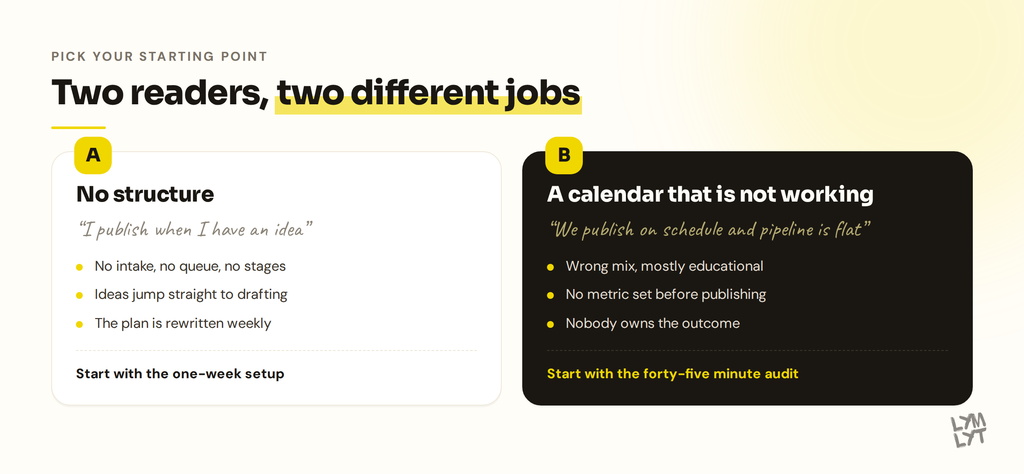
| Path A: no structure | Path B: a calendar that is not working | |
|---|---|---|
| Sounds like | “I publish when I have an idea” | “We publish on schedule and pipeline is flat” |
| The real problem | No intake, no queue, no stages | Wrong mix, wrong metrics, no ownership |
| Where to start | The one-week setup below | The 45-minute audit below |
| First win | A backlog that outlives the week | Killing the posts that were never going to work |
| Time to value | One week to set up, one quarter to see it | One afternoon to diagnose |
Path A: the one-week setup
You are already publishing. You do not need to start over. You need to get the ideas out of your head and Slack and into one place with a queue.
Day 1: dump everything (90 minutes) Open one document. Write down every content idea you have, every question sales has raised in the last quarter, every competitor page that made you uncomfortable, every support ticket theme. Do not filter. Do not organise. Aim for 40 to 60 lines.
Day 2: build the database (60 minutes) Use the Notion setup below. It takes about an hour including views. Paste the dump into it with status Inbox.
Day 3: score and sequence (60 minutes) Score every row with the three-question model below. Anything scoring 7 or higher becomes your next quarter. Anything at 3 or below gets deleted, and deleting it is the point.
Day 4: build the commercial inventory (60 minutes) Separately from the dump, list every commercial page your category supports. Competitor comparison pages, alternatives pages, integration pages, use-case pages, “best X for [segment]” roundups. You will usually find 20 to 40. Add them all. Most will not be in your dump, because nobody thinks of them unprompted.
Day 5: set the ritual (30 minutes) Put a recurring 15-minute Friday triage in your calendar and a 20-minute Monday check-in with yourself. Those two blocks are what keeps this alive after the novelty wears off.
By Friday you have a scored backlog, a full commercial inventory, a quarter’s plan, and a weekly habit. That is the whole system.
Path B: the 45-minute audit
You have a calendar. It is full. Pipeline is flat. Run these six questions against your last two quarters of published content.
| Question | A bad answer sounds like |
|---|---|
| What share of published posts were BOFU or commercial? | “Maybe two out of thirty” |
| Which post drove the most pipeline last quarter? | “I would have to check with sales” |
| What was each post supposed to do before it published? | “Get traffic” |
| Which cluster does each post belong to? | “They are all kind of about our category” |
| When did you last update a post from 2024? | Silence |
| Do ChatGPT and Perplexity name you on your top five buying questions? | “We have never checked” |
Two or more bad answers means the problem sits upstream of production. You are shipping fine. The plan is wrong.
The most common single fix: you have almost no commercial content, and your entire program is educational posts competing for queries that AI answers now absorb. That is the next section.
Forget the 50/30/20 rule
Almost every content calendar guide, including the earlier version of this one, tells you to run 50% top of funnel, 30% middle, 20% bottom.
That number is not a benchmark. Nobody measured it. It got repeated until it sounded like research. Treating it as a target has cost teams real money, because for most B2B SaaS companies it is backwards at the stage they are actually at.
Why BOFU comes first
BOFU keywords have low volume and low competition, and the people typing them are ready to buy. “Best CRM for recruiting agencies” is a smaller search than “what is a CRM”, and it is worth ten times more. A new or low-authority site can win the first one this quarter. It will lose the second one for years.
The AI shift made this argument stronger. Evertune reviewed the 6,000 most-cited URLs per model across ChatGPT, Copilot, Gemini, AI Mode, AI Overviews, and Perplexity, and found that 63% of nearly 400 million citations pointed at listicles, with ranked top-N lists making up most of them. Wix Studio’s separate analysis of 75,000 AI answers put listicles at the top of the citation pile for commercial-intent queries. The commercial layer of AI search runs on comparison content.
Meanwhile the informational content that fills most calendars is exactly what AI answers absorb. Pew tracked 68,879 Google searches and found that when an AI summary appeared, people clicked a normal result in 8% of visits, against 15% with no summary. Clicks on the sources cited inside the summary happened about 1% of the time. Search Engine Land covered the study and the Pew short read has the full data.
Why BOFU-only stops working
One comparison page per real competitor, one alternatives page for your own brand, one for each major competitor, a “best X for [segment]” roundup per ICP segment, an integration page per meaningful integration, a use-case page per job to be done. For most SaaS companies that is 20 to 40 pages.
Publish four a month and you are out of runway inside a year. After that you are inventing commercial pages nobody searches for, which is worse than writing nothing.
So: sequence, not ratio
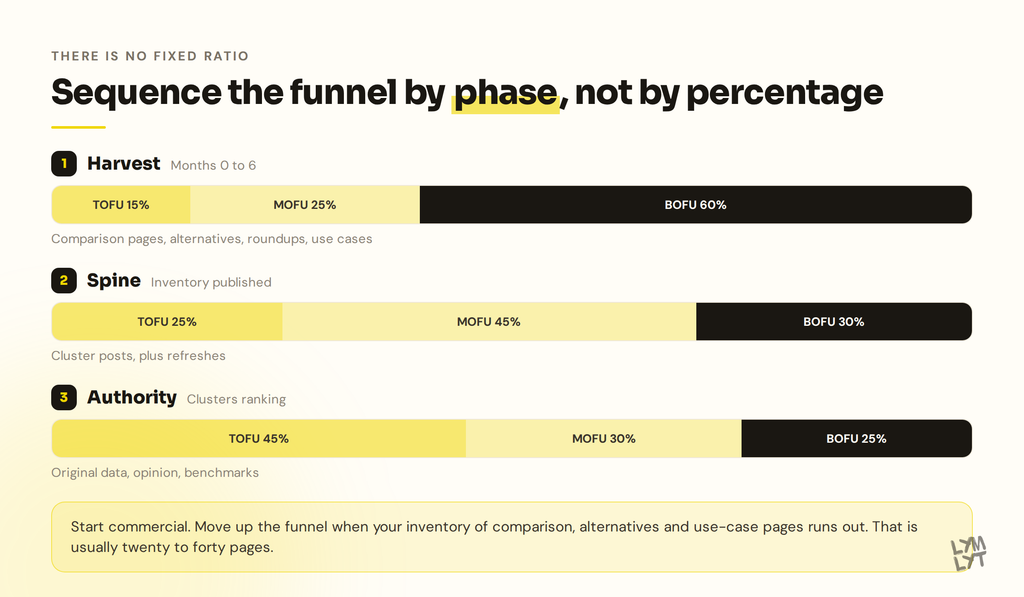
| Phase | When you are here | TOFU | MOFU | BOFU | What you publish |
|---|---|---|---|---|---|
| 1. Harvest | Months 0 to 6, or any site with no commercial pages | 15% | 25% | 60% | Comparison pages, alternatives pages, roundups, use cases, integrations, case studies |
| 2. Spine | Commercial inventory published, clusters forming | 25% | 45% | 30% | Cluster posts around the problems your product solves, plus refreshes |
| 3. Authority | Clusters ranking, you need links and citations | 45% | 30% | 25% | Original data, opinion, category-defining pieces, benchmarks |
Those percentages are starting points, not targets. Adjust them on what actually converts for you. The sequence is the part that holds.
When to move phase
- Phase 1 to 2: you have published every commercial page you could find, and new ones are being invented rather than discovered.
- Phase 2 to 3: your clusters rank, and further progress needs links and third-party mentions rather than more posts.
One honest caveat about roundups
If you publish a “best X” listicle that ranks your own product first, you are in FTC territory. The rule prohibits misrepresenting that a site you control provides independent reviews of a category that includes your own products. Evertune flagged the same risk in the study above, alongside Google’s stated intent to act on self-promotional listicles.
The workaround is boring and it works. Name real competitors. Rank honestly by use case. Win the segment where you genuinely fit and say plainly who the others are better for. A roundup that only flatters you gets treated as a brochure by readers and engines alike.
There is a second consequence worth planning for. Studies keep finding that most AI citation weight in SaaS categories sits on third-party sites rather than the brand’s own domain. Your own alternatives page matters for the buyer who lands on it. Getting into somebody else’s roundup matters for the buyer who never leaves ChatGPT. Both belong in the calendar, and only one of them is a writing task. More on that in the distribution section.
Step 1: one calendar, every channel
The mistake that creates a social content problem is running a separate social calendar. Two backlogs means two idea pipelines, two sets of priorities, and a LinkedIn account that talks about things the blog never covers.
One backlog. One source idea. Multiple rows.
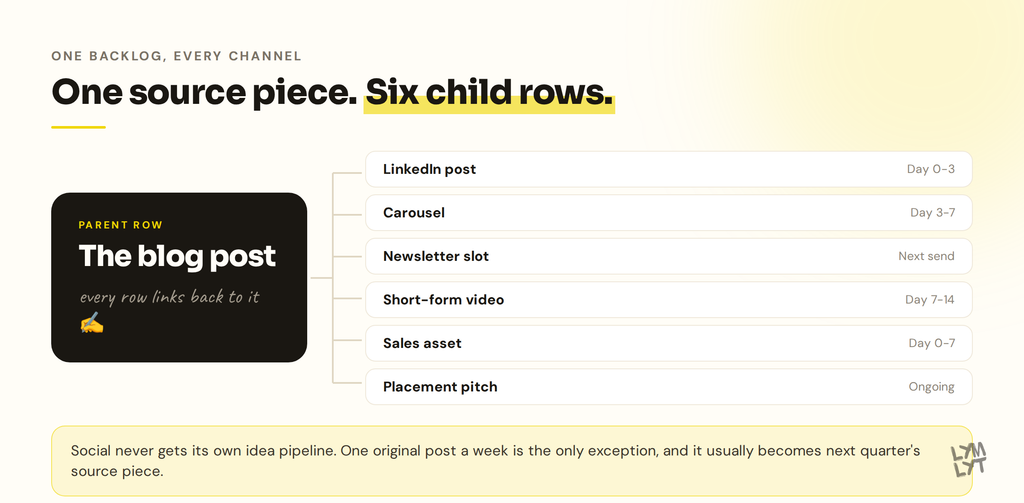
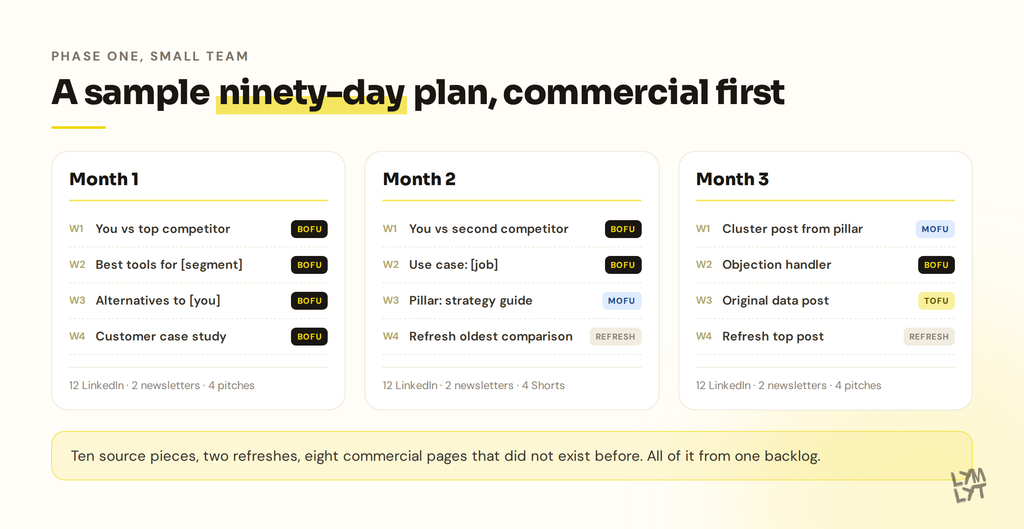
Structure it as parent and children. The blog post is the parent. Everything derived from it is a child row with its own owner, date, and status.
| Row type | What it is | Typical lag from parent |
|---|---|---|
| Source piece | The blog post, guide, case study, or comparison page | Day 0 |
| LinkedIn post | One idea from the piece, written as a standalone argument | Day 0 to 3 |
| LinkedIn carousel | The piece’s best table or framework, 6 to 8 slides | Day 3 to 7 |
| Newsletter slot | Short intro plus the link, in the next issue | Next send |
| Short-form video | One claim, 45 seconds, filmed against a stat card | Day 7 to 14 |
| Community reply | An answer in a real thread where the question came up | Whenever it comes up |
| Sales asset | A one-pager or snippet a rep can send | Day 0 to 7 |
| Placement | A pitch to get included in someone else’s roundup | Ongoing |
Two of those are not writing tasks. Community reply and Placement are outreach, and they sit in the same calendar because they compete for the same hours.
Channel cadence that survives contact with reality
| Channel | Realistic cadence | Sourced from |
|---|---|---|
| Blog | 2 to 6 per month | The backlog |
| 3 per week | Derived rows, plus one original per week | |
| Newsletter | Every 2 weeks | The month’s best source piece |
| Short-form video | 2 per week | Derived rows |
| Placements | 5 pitches per month | The commercial inventory |
The rule that makes this work: social never gets its own idea pipeline. Every social row traces back to a parent. The one exception is a weekly original post where you say something you have not written up yet, which often becomes next quarter’s blog post.
Step 2: fix the intake, not the calendar
The reason your plan gets rewritten every week is that ideas go straight from Slack into production. Sales says something on Monday and it is a draft by Wednesday. Nothing filters it, so everything jumps the queue.
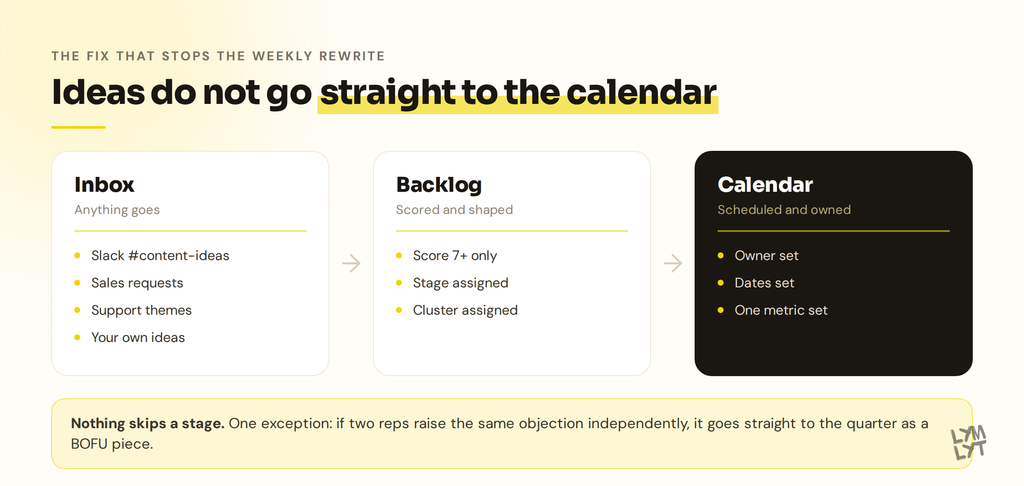
Put a wall between where ideas arrive and what gets scheduled.
Three stages, in order
- Inbox. Anything goes. Zero standards. A one-line note is enough. Sales requests, competitor pages, support themes, and your own shower thoughts all land here.
- Backlog. Scored, with a stage and a cluster assigned. Enough shape that someone could brief it.
- Calendar. Scheduled, owned, dated. Only quarterly planning moves things here.
Nothing skips a stage. That single rule is most of the value.
Capture without friction
Make a #content-ideas Slack channel and tell sales, support, and the founders it exists. One idea per message. No format required. React with a checkmark once it is triaged so nothing gets processed twice.
Friday triage is 15 minutes: read the channel, score each idea, move it to Backlog or delete it. Deleting is normal. Most ideas are fine and not worth a quarter.
The three-question score
Score each idea 1 to 3 on each question.
| Question | 1 | 2 | 3 |
|---|---|---|---|
| Does a buyer actually search or ask this? | It is our internal language | Plausible, unverified | Real volume, a sales call, or a prompt we tested |
| Do we need more of this stage this quarter? | We have plenty | Neutral | This is the gap |
| Can we say something only we can say? | Anyone could write it | Some original angle | We have data, customers, or a real position |
7 to 9: next quarter. 4 to 6: backlog, revisit next time. 3 or below: delete.
The sales override
One exception. If two different reps raise the same objection or question independently, it skips scoring and goes straight to the quarter as a BOFU piece. Two reps means it is costing you deals right now.
Step 3: build it in Notion
An hour of setup. Use these exact property names so the Claude prompts later work without editing.
Database 1: Content
| Property | Type | Options |
|---|---|---|
| Title | Title | |
| Type | Select | Source piece, LinkedIn post, Carousel, Newsletter, Short, Community reply, Sales asset, Placement |
| Channel | Multi-select | Blog, LinkedIn, Newsletter, YouTube, Sales, Off-site |
| Stage | Select | TOFU, MOFU, BOFU, Refresh |
| Phase fit | Select | Harvest, Spine, Authority |
| Cluster | Relation → Clusters | |
| Focus keyword | Text | |
| Prompt target | Text | |
| Persona | Select | Your ICP segments |
| CTA | Select | Demo, Newsletter, Free tool, Related post, None |
| Target metric | Text | |
| Score | Number | |
| Source of idea | Select | Sales, Support, Keyword research, Competitor, Original |
| Owner | Person | |
| Status | Select | Inbox, Backlog, Brief, Drafting, Review, Scheduled, Live |
| Due date | Date | |
| Publish date | Date | |
| Parent piece | Relation → Content (self) | |
| Last refreshed | Date | |
| AI citation | Select | Cited, Mentioned, Absent, Not checked |
| URL | URL |
Database 2: Clusters
Title, Pillar page (relation to Content), Status (Planned / Building / Ranking), Notes. Four properties. Do not over-build it.
The five views you actually use
- This week. Board grouped by Status, filtered to Publish date within the next 14 days. Your daily screen.
- Intake. Table filtered to Status = Inbox, sorted by Score descending. Friday triage screen.
- Quarter by stage. Board grouped by Stage, filtered to this quarter. This is the view that catches an all-TOFU quarter before you live it.
- Refresh queue. Table filtered to Status = Live and Last refreshed before six months ago, oldest first.
- Calendar. Notion’s calendar layout on Publish date, with Channel shown. This is where the multichannel picture becomes obvious.
The self-relation on Parent piece is what makes one calendar cover every channel. Open a blog post and you see its carousel, its Short, and its newsletter slot as linked rows with their own owners and dates.
The property most people skip
Prompt target is the sentence a buyer would type into ChatGPT. Not a keyword. “Which content calendar tool works for a two-person SaaS marketing team” is a prompt target. “content calendar tools” is a keyword. You want both, because they now behave differently. Our guides on GEO vs AEO vs SEO and Google AI Mode cover why.
Step 4: connect Claude to Notion
Once the database exists, connecting Claude to it removes most of the admin. Claude can read the backlog, score new rows, write briefs into pages, and build a quarter plan without you copy-pasting anything.
Setup, about five minutes
- In Claude, open Settings → Connectors.
- Find Notion in the directory and click Connect. If it is not listed, use Add custom connector with the URL
https://mcp.notion.com/mcp. - Sign in to Notion, choose the workspace holding your calendar, and approve access.
- In a chat, hit the + button in the composer, open Connectors, and switch Notion on.
Three things worth knowing first:
- One Claude account connects to one Notion workspace at a time. If you run separate workspaces for company and client work, you will be switching.
- The connector acts with your full Notion permissions. It reaches everything your account can reach, not just the pages you had in mind. If that matters, connect a guest account that only has access to the content workspace.
- On Team and Enterprise plans an owner may need to approve the connector once for everyone.
Build a Claude Project for content
Connectors give Claude hands. A Project gives it context. Create one called Content and put these in the project knowledge:
- Your ICP definition and segments
- Positioning and the competitor list with one line on each
- Voice notes: what you sound like, what you never say
- Three published posts you consider on-brand
- The cluster map
- Your current phase and the target mix
Every prompt below runs better inside that project, because Claude stops guessing at who you sell to.
For the drafting side, our free content brief generator turns a keyword into a writer-ready brief with no setup, which is often the step where the calendar stalls.
Step 5: seven prompts you can paste
These assume the Notion connector is on and the property names above. Adjust the bracketed parts.
1. Friday intake triage
Read the Content database in Notion. Pull every row with Status = Inbox.

For each one, score 1-3 on:
- Does a buyer actually search or ask this?
- Do we need more of this stage this quarter?
- Can we say something only we can say?

Then set: Score, Stage, Phase fit, Cluster (match to an existing
cluster or say NEW), and a one-line reason.

Update the rows in Notion. Move anything scoring 7+ to Status =
Backlog. List anything scoring 3 or below and ask me before deleting.
2. Build the commercial inventory
Our product is [one line]. Our real competitors are [list].
Our ICP segments are [list]. Our integrations are [list].

Build the complete list of commercial pages our category supports:
comparison pages, alternatives pages, "best X for [segment]"
roundups, integration pages, use-case pages.

For each, give the target keyword and the prompt target. Flag which
ones we have already published (check the Content database).

Create the missing ones in Notion as rows with Status = Backlog,
Stage = BOFU, Phase fit = Harvest.
3. Keyword to prompt target and brief
Focus keyword: [keyword]

1. Write five prompt targets: full sentences a B2B SaaS buyer would
   type into ChatGPT or Perplexity to reach this topic. Pick the best.
2. Run those five prompts and tell me which brands get named today.
3. Write a brief: angle, who it is for, the H2 outline, the
   one-sentence answer that should sit near the top, which of our
   posts to link to and from, and the single success metric.

Write the brief into the Notion page for this row and set Status = Brief.
4. Quarter plan from the backlog
We are in Phase [Harvest/Spine/Authority]. Target mix for this
phase is [x/y/z]. We can ship [n] source pieces per month.

Read the Content database, Status = Backlog. Build a 3-month plan
that hits the target mix, completes at least one cluster, and puts
the highest-scoring commercial pages first.

Show it as a table by month and week before you write anything to
Notion. Tell me what you are deliberately leaving out and why.
5. One post into channel rows
Here is the published post: [URL or paste].

Create child rows in the Content database with Parent piece set to
this post:
- 2 LinkedIn posts, each making one argument from the piece, written
  to stand alone
- 1 carousel outline from the strongest table or framework
- 1 newsletter slot, three sentences plus the link
- 1 Short script, 45 seconds, one claim, with the on-screen text

Set Channel, Owner = me, and Publish dates staggered over 14 days
from the parent's publish date. Draft the copy into each page.
6. Monthly citation check
Pull every row from the Content database with Status = Live and a
Prompt target set.

For each prompt target, run the prompt and tell me whether we are
cited with a link, mentioned by name without a link, or absent.
Note which competitors and which third-party sites show up instead.

Update the AI citation property on each row. Then give me the five
biggest gaps and what would close them.
7. Refresh queue audit
Pull rows with Status = Live and Last refreshed more than 6 months ago.

For each, check the live URL and list: stats older than 18 months,
pricing that may have changed, dead links, screenshots that look
dated, and anything a competitor now covers better.

Rank by fixing effort against likely return. Give me the top five
and what specifically to change in each.
Prompt 6 is the one that changes how you plan. It is also the one nobody runs, because it is nobody’s job until it is on the calendar. Our post on AI citations vs AI mentions explains why the difference between those two matters more than it sounds, and the free AI visibility checklist gives you a baseline before you start.
Step 6: set a cadence you can hold
Publishing eight posts a month sounds impressive. For a two-person team it produces eight mediocre posts, and mediocre content no longer ranks, converts, or gets cited.
| Team setup | Source pieces per month | Plus | Notes |
|---|---|---|---|
| Solo marketer | 2 | 6 LinkedIn, 1 newsletter, 1 refresh per quarter | Both source pieces commercial in Phase 1 |
| Small team, 2 to 3 people | 4 to 6 | 12 LinkedIn, 2 newsletters, 8 Shorts, 1 refresh | One placement pitch per week |
| Larger or fully outsourced | 8 to 12 | Full channel coverage, 2 refreshes | Needs a real production workflow |
At the top end, building a SaaS content engine with defined workflows stops being optional. Without one, quality drops within a quarter.
Founders who write their own posts usually find either the posts never get written or they get written at the cost of everything else. On what to spend, our guides to content marketing budgets and what content marketing costs for B2B SaaS have real numbers.
Step 7: plan distribution and placement before writing
Distribution goes into the calendar before the writing starts. The writer needs to know a post is becoming a carousel, because it changes how the piece is structured. Prompt 5 above creates those rows for you.
The placement play
This is the part most calendars have no row type for.
If most AI citation weight in your category sits on third-party sites, then getting listed inside somebody else’s “best X” roundup is worth more per hour than another post on your own blog. It is outreach, not writing, and it belongs on the calendar with an owner and a date.
How to run it:
- Run your top ten prompt targets in ChatGPT and Perplexity. Write down every third-party site that gets cited.
- Sort by how often they appear across prompts. The top ten are your target list.
- Check whether each already has a roundup covering your category. If they do, you want to be added. If they do not, you want to pitch one.
- Five pitches a month, tracked as
Placementrows.
The hit rate beats cold link outreach, and the payoff compounds differently, because a citation keeps returning you in answers rather than passing traffic once.
The same logic explains why Reddit, LinkedIn, and YouTube keep appearing in AI citation studies, and why G2 and Capterra visibility belongs in the same planning conversation as your blog.
The SaaS content distribution playbook covers the owned-channel side. If newsletters are part of your mix, our B2B newsletter templates save a planning session, and the social media calendar for 2026 is useful for layering dates worth planning around.
Step 8: one metric per row
Every row gets one success metric before it publishes. Not traffic as a catch-all.
| Stage | Primary metric | Secondary signals |
|---|---|---|
| TOFU | Organic sessions and position | Backlinks earned, AI citations on the prompt target |
| MOFU | Scroll depth and CTA clicks | Time on page, email signups, return visits |
| BOFU | Demo requests and form fills | Assisted conversions, rep usage, deal influence |
| Placement | Inclusion in the target roundup | Appearance rate across your prompt set |
| Refresh | Position recovery on the target term | Re-citation in AI answers |
Two cautions. AI referral traffic often lands in analytics as direct, so some of your best work will look like it did nothing. And be careful with the ROI story you take to leadership. Our piece on why your AI visibility ROI number is mostly a guess covers what to report instead of a fabricated figure.
The full breakdown of SaaS content metrics that matter covers the reporting side, and AI SEO statistics has the numbers behind the ranking-and-citation split.
Step 9: schedule refreshes as real work
Content decays. Screenshots go stale, pricing changes, the 2024 stat gets superseded, a competitor publishes something better, and the post loses positions quietly.
| Content type | Refresh interval | What changes |
|---|---|---|
| Statistics and roundups | Every 3 to 6 months | Numbers, sources, publish date |
| Tool and pricing comparisons | Every 3 months | Pricing, features, screenshots |
| Pillar guides | Every 6 months | New sections, internal links, examples |
| Evergreen how-tos | Every 12 months | Screenshots, examples, dead links |
| Comparison and alternatives pages | Every 6 months | Competitor claims, positioning, proof |
Budget one refresh slot for every four new source pieces. On a six-piece month that is five new and one updated. Teams that hold this usually find refreshes return more per hour than new posts, because the page already has history and links.
Prompt 7 above builds the queue. Run it monthly.
Step 10: build around clusters, not one-off posts
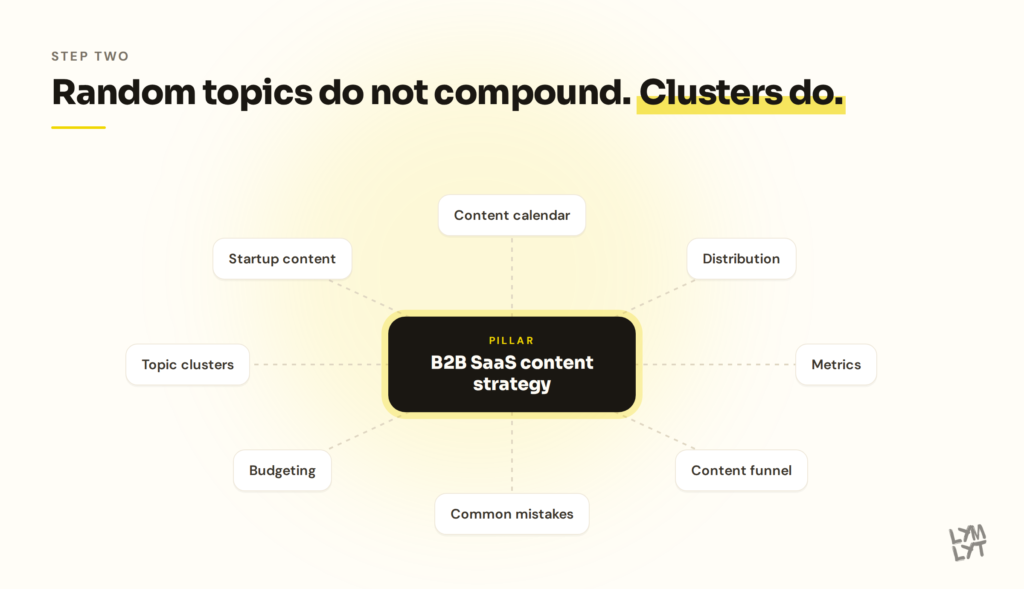
Random topics do not compound. Clusters do.
A cluster is a pillar post covering the broad topic, cluster posts going deep on subtopics, and internal links tying every piece to the pillar and to each other. That structure is how Google works out you have real expertise, and it matters more to AI engines, which pull from sources that cover a subject thoroughly.
A cluster for this topic:
- Pillar: how to build a B2B SaaS content strategy
- Cluster: content calendar, distribution, metrics, funnel, common mistakes, budgeting, topic clusters, startup content
Before adding a topic, ask which cluster it belongs to. If it fits nothing and starts nothing, it is a distraction. Our posts on topical authority and topic clusters vs keyword lists go deeper.
One technical note that belongs in a planning conversation: AI crawlers render JavaScript far less often than Google does. If your blog is a client-side app, some of your best work may be invisible to the engines you want citing you.
A sample 90-day plan
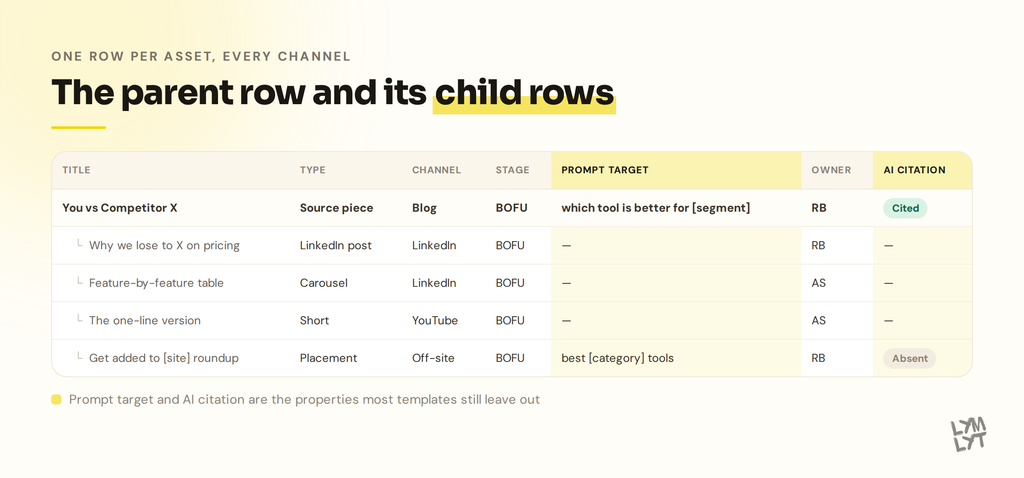
Four source pieces a month, Phase 1, small team. Derived rows are not listed but every source piece generates three to five.
| Month | Week | Source piece | Stage | Also this week |
|---|---|---|---|---|
| 1 | 1 | You vs [top competitor] | BOFU | 3 LinkedIn, 2 placement pitches |
| 2 | Best [category] tools for [ICP segment] | BOFU | 3 LinkedIn, newsletter | |
| 3 | Alternatives to [your brand] | BOFU | 3 LinkedIn, 2 Shorts | |
| 4 | Customer case study | BOFU | 3 LinkedIn, 2 placement pitches | |
| 2 | 1 | You vs [second competitor] | BOFU | 3 LinkedIn, newsletter |
| 2 | Use case: [job to be done] | BOFU | 3 LinkedIn, 2 Shorts | |
| 3 | Pillar: [your category] strategy guide | MOFU | 3 LinkedIn, 2 placement pitches | |
| 4 | Refresh: oldest comparison page | Refresh | 3 LinkedIn, newsletter | |
| 3 | 1 | Cluster post from the pillar | MOFU | 3 LinkedIn, 2 Shorts |
| 2 | Objection handler from sales calls | BOFU | 3 LinkedIn, 2 placement pitches | |
| 3 | Original data or benchmark post | TOFU | 3 LinkedIn, newsletter | |
| 4 | Refresh: highest-traffic post losing position | Refresh | 3 LinkedIn, 2 Shorts |
By day 90: ten new source pieces, two refreshes, eight commercial pages that did not exist before, roughly 36 LinkedIn posts, six newsletters, eight Shorts, and eight placement pitches. All from one backlog.
The mix runs BOFU-heavy on purpose. That is Phase 1. By month nine it should look different.
The rituals that keep it alive
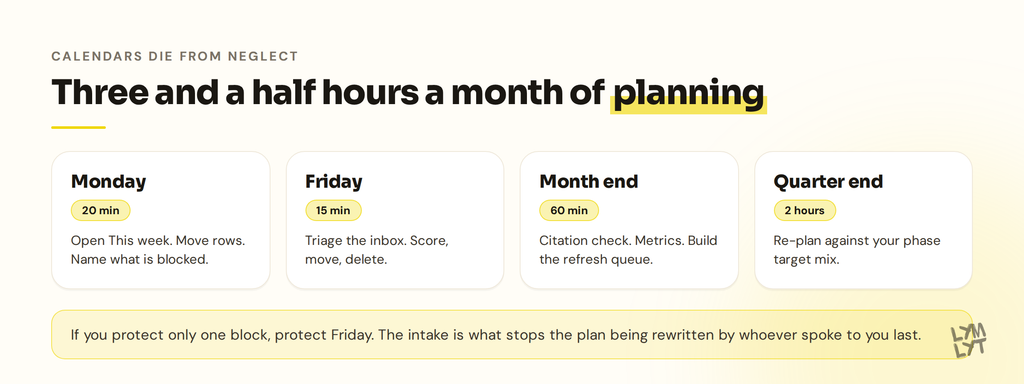
A calendar dies from neglect, not from bad design. Four blocks.
| When | Length | What happens |
|---|---|---|
| Monday | 20 min | Open the This week view. Move rows. Name what is blocked. |
| Friday | 15 min | Run prompt 1 on the intake. Score, move, delete. |
| Month end | 60 min | Run prompts 6 and 7. Update metrics. Build the refresh queue. |
| Quarter end | 2 hours | Run prompt 4. Check the mix against your phase. Re-plan. |
That is three and a half hours a month of planning. Everything else is production.
If you only protect one block, protect Friday. The intake is what stops the plan from being rewritten every week by whoever spoke to you last.
Where to build it
The tool matters less than the columns. Pick the one your team already opens daily.
| Tool | Best for | Watch out for |
|---|---|---|
| Notion | Teams who want briefs, calendar, and Claude access in one place | Easy to over-build the database and never use it |
| Google Sheets | Anyone who wants it running in twenty minutes | Ugly past 100 rows, no parent-child relations |
| Airtable | Larger programs needing multiple views and automations | Costs climb with seats and records |
| Asana or ClickUp | Teams already running production in a project tool | Task view hides the strategic columns |
| Trello | Very lean teams who think in stages | Weak for reporting and filtering |
Notion is the recommendation here for one reason: the parent-child relation and the Claude connector. Sheets cannot do the first and does the second badly.
Content marketing vs product-led growth
Some teams reach a point of asking whether content is the right investment against doubling down on PLG. The answer depends on your ICP and sales motion.
For content marketing at SaaS startups in competitive categories, organic compounds in a way paid never does. A commercial page that ranks today keeps generating pipeline for years. Paid stops the moment you stop paying. Content marketing vs product-led growth is a sequencing question for most B2B SaaS companies.
A calendar built this way becomes a compounding asset. Every cluster makes the next easier. Every commercial page you own is one a competitor cannot.
Frequently asked questions
What is a B2B SaaS content calendar? It is an operating system that ties every planned piece of content to a buyer, a funnel stage, a topic cluster, a target keyword or AI prompt, an owner, and one success metric. It covers every channel from a single backlog, so the blog post, the LinkedIn post, and the newsletter all trace back to the same idea.
How is it different from an editorial calendar? An editorial calendar tracks production: what is being written, by whom, and when it ships. A content calendar adds funnel stage, cluster, persona, CTA, and target metric, so you can audit whether the plan can produce pipeline before spending a quarter on it.
Is the 50/30/20 funnel split real? No. It circulates widely and nobody measured it. Use a phased sequence instead. Early programs should run BOFU-heavy, around 60% commercial content, and shift upward as their commercial inventory runs out. By the time clusters are ranking, a mix closer to 45/30/25 makes sense.
Should I write BOFU content first? For most B2B SaaS companies, yes. BOFU keywords have low volume, low competition, and buyers ready to decide. AI search reinforces this, since listicle and comparison formats take the largest share of citations on commercial queries. The limit is inventory: most categories support 20 to 40 commercial pages, and after that you have to move up the funnel.
How do I plan blog and social in one calendar? Use a parent-child structure. The blog post is the parent row. The LinkedIn post, carousel, newsletter slot, and Short are child rows with their own owners and dates. Social never gets its own idea pipeline, with one weekly exception for an original post.
How many blog posts per month should a B2B SaaS company publish? Match cadence to capacity. Two source pieces a month for a solo marketer, four to six for a small team, eight to twelve for a larger or outsourced program. Four excellent pieces beat eight average ones.
How do I stop sales requests from derailing the plan? Put a wall between intake and calendar. Ideas land in an Inbox, get scored on a Friday, and only quarterly planning moves them to the calendar. One exception: if two reps raise the same thing independently, fast-track it as a BOFU piece.
Can I connect Claude to my Notion content calendar? Yes. In Claude, go to Settings, then Connectors, find Notion and authorise it, or add a custom connector using https://mcp.notion.com/mcp. One Claude account connects to one Notion workspace at a time, and the connector acts with your full Notion permissions.
What should Claude actually do in this workflow? Score the intake, build the commercial inventory, turn keywords into prompt targets and briefs, draft the quarter plan from the backlog, generate the channel rows from a published post, run the monthly citation check, and build the refresh queue. Seven prompts cover all of it.
Should the calendar track AI search? Yes. Add a prompt-target field recording the question a buyer would type into ChatGPT or Perplexity, and check monthly whether you are cited, mentioned, or absent. Ranking and citation no longer move together.
How often should I update old posts? Statistics and roundups every three to six months, pricing and tool comparisons every three, pillar guides and comparison pages every six, evergreen how-tos annually. Reserve one refresh slot for every four new pieces.
Who should own the content calendar? One person, preferably someone who owns a pipeline number rather than a publishing number. Shared ownership is the fastest route back to a plain publishing schedule.
Can a two-person team run this? Yes. Two source pieces a month, six LinkedIn posts, one newsletter, one refresh a quarter. The intake discipline matters more than volume. A small calendar everyone follows beats a large one nobody maintains.
The bottom line
If you have no structure, spend a week: dump every idea, build the Notion database, score the backlog, list your commercial inventory, and set the Friday triage. That is the whole setup.
If you have a calendar that is not producing pipeline, run the six-question audit. Usually the answer is that you have almost no commercial content and your whole program is competing for queries AI now answers.
Either way, the rules that matter:
- Sequence the funnel by phase. BOFU first. Ignore the 50/30/20 myth.
- One backlog for every channel, with parent and child rows.
- Intake is separate from calendar, and nothing skips a stage.
- Every row has an owner, a stage, a prompt target, and one metric.
- Placements belong on the calendar alongside posts.
- Refreshes are scheduled work, not a someday project.
If you would rather have this built for you, that is what LymLyt does. Grab 30 minutes with us and you will leave with a calendar built for your ICP, phase, and pipeline goals. No pitch deck, no pressure.
Or see what we have built for B2B SaaS clients, or check pricing for a straight number.
New to the terminology? The content marketing glossary and AI visibility glossary are available.

Jay is the co-founder of LymLyt and an AI partnership consultant helping B2B SaaS companies grow through content strategy, SEO, and AI integration. He writes about content marketing, what makes B2B content convert, and how SaaS teams can build content systems that drive real pipeline.