ChatGPT Business Hub: What B2B SaaS Teams Can Finally Measure (& what it hides)
For two years, nobody could tell you how often ChatGPT mentioned their brand. You ran prompts by hand, bought a tracking tool, or guessed.
That changed on November 10. OpenAI launched ChatGPT Business Hub, part of a beta it calls Businesses in ChatGPT, and it shows a business its own mentions and the clicks ChatGPT sends to its website (Search Engine Roundtable).
BrightLocal calls ChatGPT the first AI platform to share click data with businesses. It’s also limited, and easy to misread. This guide covers what ChatGPT Business Hub shows, what it leaves out, how to claim your business, and how a B2B SaaS team should actually use the data.
What is ChatGPT Business Hub?
ChatGPT Business Hub is a dashboard where a business can claim its presence in ChatGPT, update its details and see engagement data. OpenAI pitches it as a way to “connect with the 1.2 billion people who use ChatGPT each week,” as quoted by Search Engine Roundtable.
Think of it as an early, AI version of Google Business Profile and Search Console in one place. You can:
- Claim and verify your business
- Edit details like your description, category and products (BrightLocal)
- See how often ChatGPT mentions your website and how many people click through
- Set up a business agent that answers questions about your offering, starting with “eligible ecommerce and online service businesses in the U.S.” (Search Engine Roundtable)
It’s a beta, so expect the features and rules to change.
The four numbers it shows
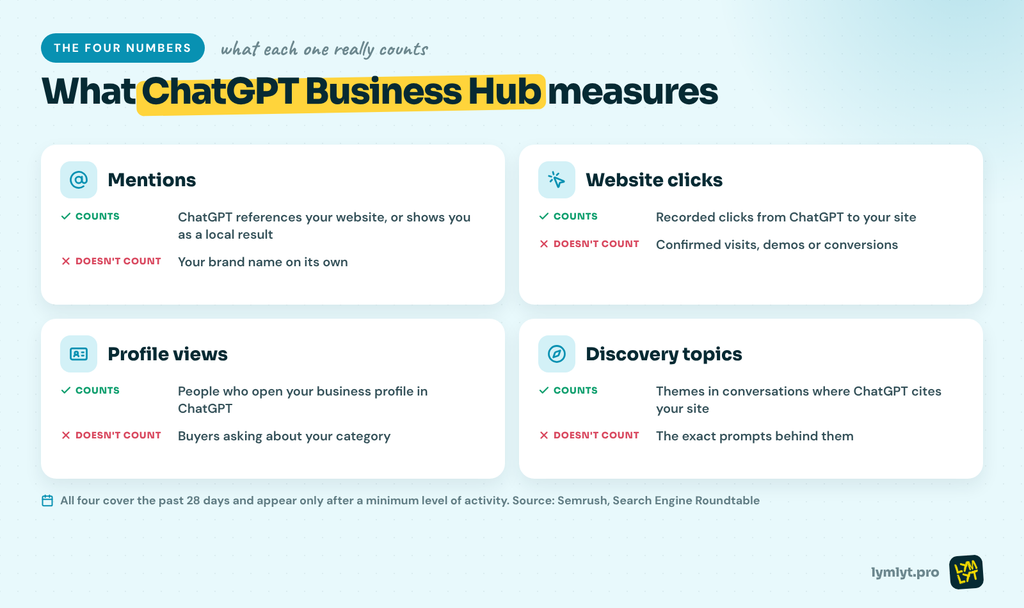
ChatGPT Business Hub reports four metrics. Each one is narrower than its name suggests.
1. Mentions. The number of times ChatGPT references your website or shows your business as a local result. Your brand name on its own doesn’t count. As Semrush puts it: “Your brand name alone doesn’t count.” So if ChatGPT names you in a shortlist without linking or citing your site, it won’t show up here. That’s why this number will usually run lower than what a citation tracking tool reports. If the difference between the two is fuzzy, read AI citations vs AI mentions.
2. Website clicks. The number of recorded clicks from ChatGPT to your site. The in-product tooltip is clear about the limit: “Clicks don’t confirm website visits or conversions” (Search Engine Roundtable). A click is not a session in GA4, and it’s definitely not a demo.
3. Profile views. How many people opened your business profile inside ChatGPT. For most B2B SaaS companies this will be small, since buyers ask about categories and problems, not your profile.
4. Discovery topics. The common themes in conversations where ChatGPT cites your website. This is the most useful number for content teams. It tells you which subjects ChatGPT already trusts you on.
All four are aggregated over the past 28 days and only appear once you pass a minimum level of activity (Semrush). You can’t see individual conversations.
What ChatGPT Business Hub doesn’t show you
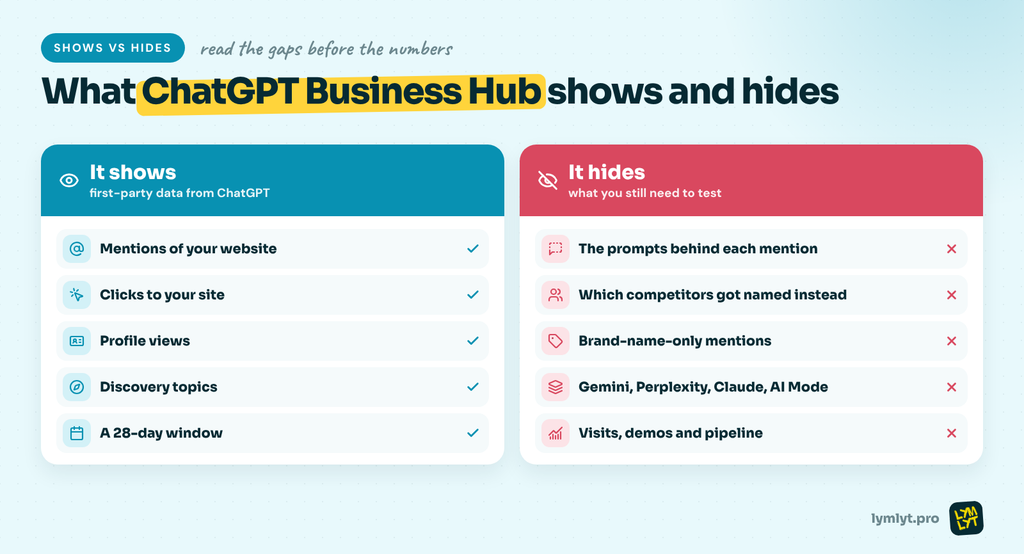
This is where most teams will misread the data. Four gaps matter:
- No prompts. You see that ChatGPT mentioned you, not which question triggered it. John Shehata of NewzDash told Digiday the data has no prompts, no per-page breakdown and no competitor benchmarks.
- No competitors. You can’t see who ChatGPT recommended instead of you. For a B2B SaaS company, that’s the question that matters most when a buyer asks for a shortlist.
- Only ChatGPT. Gemini, Perplexity, Claude and Google’s AI Mode aren’t in here. Your buyers use more than one engine. See Claude vs ChatGPT vs Gemini vs Perplexity vs Grok for how differently they answer.
- No pipeline. Clicks stop at the click. Barry Adams of Polemic Digital summed up the context problem to Digiday: “We don’t know the contexts in which our websites are mentioned, except in the vaguest of terms.”
One more thing: claiming your profile won’t make ChatGPT mention you more. Semrush, citing OpenAI’s help doc, says: “Claiming your profile also won’t change how often you show up.” The details you add can shape how ChatGPT describes you (BrightLocal), but visibility still comes from what the web says about you.
How to claim your business in ChatGPT
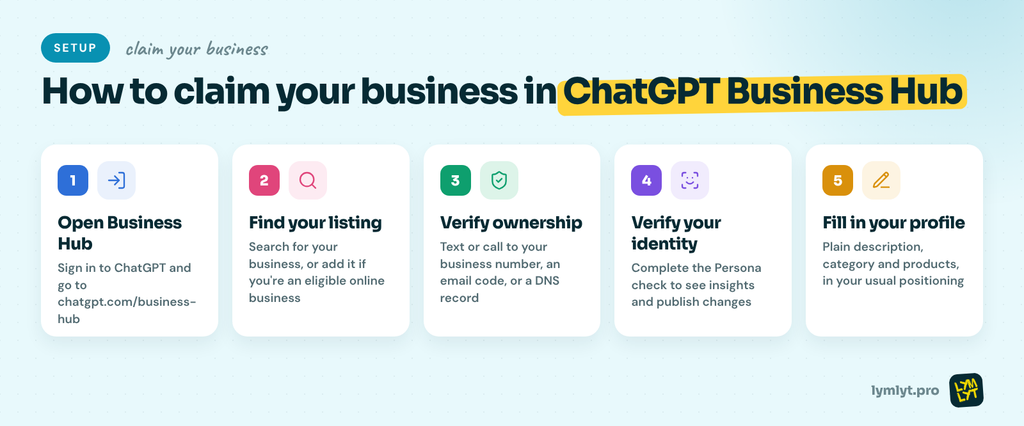
You’ll need access to your domain, business email or main phone line.
- Open Business Hub. Sign in to ChatGPT and go to chatgpt.com/business-hub.
- Find your listing. Search for your business and select it. Eligible online businesses can add a listing if it’s missing. Local stores and restaurants “can currently claim only an existing U.S. listing” (BrightLocal).
- Verify ownership. Use a text or call to your main business number, a code sent to your business email, or a DNS record (Semrush). For SaaS companies, DNS is usually the fastest.
- Verify your identity. Complete the Persona check. It’s required before you can see insights or publish changes, and it can ask for ID and business registration details (BrightLocal).
- Fill in your profile. Write a plain description of what you do and who it’s for. Use the same words your positioning uses everywhere else.
Two warnings before you click accept:
- Data can take a while. Barry Schwartz claimed his listing on launch day and posted a week later: “A week later, I still have zero data” (Search Engine Roundtable).
- Read the terms. Digiday reported that OpenAI’s terms ask businesses to give up certain legal claims, including over content published before sign-up. An OpenAI spokesperson told Digiday the terms “were not intended to cover this scenario.” Run it past your legal team if you’re a publisher-heavy brand.
How B2B SaaS teams should use the data
ChatGPT Business Hub is a useful baseline, not a strategy. Here’s how to use it without fooling yourself.
Set a baseline now. Note your mentions, clicks and discovery topics this month, even if they’re small. Shehata’s advice to publishers in Digiday applies to SaaS too: track the trend, not the single number.
Pair it with prompt testing. Business Hub tells you that you were mentioned. A shortlist test tells you where you’re missing. Run the buyer questions from our AI visibility audit across ChatGPT, Gemini and Perplexity. The gap between the two is your content plan. Our Shortlist Benchmark shows which prompt types to include.
Use discovery topics to pick content. If ChatGPT already cites you on “SaaS onboarding,” build more depth there before chasing a new topic. Then check the questions you’re absent from, like pricing prompts and migration prompts, where buyers decide.
Report clicks and mentions separately. Shehata put it simply: “A citation is a visibility outcome. A visit is an audience outcome.” Keep them as two lines in your report. Don’t promise pipeline from either. Our guide to reporting AI visibility ROI covers what to show your CFO instead.
Don’t panic over low numbers. Lily Ray told Digiday her consultancy logged four clicks from 25 mentions. Plenty of buyers read the answer and never click, which is the dark funnel in action. Low clicks can still mean ChatGPT is shaping your buyers’ shortlist.
Will it replace AI visibility tools?
No. Lily Ray called the data “extremely valuable” as a first-party signal, but added: “It’s not going to replace any of the tools I’m using” (Digiday).
That’s the right way to see it. ChatGPT Business Hub is first-party truth for one engine. Tracking tools give you prompts, competitors and multiple engines. You need both. Our list of AI visibility tracking tools and AEO tools for B2B SaaS can help you pick the second half.
FAQ
Is ChatGPT Business Hub free?
None of the coverage so far mentions a fee for claiming a listing or viewing insights. It’s in beta, so that could change.
Who can use ChatGPT Business Hub?
Online businesses can claim a listing wherever ChatGPT is available. Local stores and restaurants can only claim an existing U.S. listing for now (BrightLocal). Business agents start with eligible U.S. ecommerce and online service businesses.
Does claiming my business improve my ChatGPT rankings?
No. OpenAI’s help doc, as quoted by Semrush, says claiming won’t change how often you show up. To get mentioned more, you need content and third-party sources AI engines trust. Start with why your site doesn’t show up in ChatGPT.
Why does Business Hub show fewer mentions than my tracking tool?
Because it only counts mentions of your website or local listing, not your brand name on its own. Tracking tools usually count brand-name mentions too.
Why is my Business Hub data empty?
Data only appears after you pass a minimum activity level, and it can take days to show up. Some early users saw nothing for over a week.
The bottom line
ChatGPT Business Hub gives brands their first first-party numbers from an AI engine. Claim your listing, set a baseline and watch your discovery topics.
Just don’t treat it as the full picture. It won’t show the prompts you’re missing, the competitors beating you or the engines your buyers use besides ChatGPT. That still takes testing and the right content.
If you want to know where you stand across every engine, LymLyt’s AI visibility service maps it for you and builds the content that closes the gap. Book a call.

Jay is the co-founder of LymLyt and an AI partnership consultant helping B2B SaaS companies grow through content strategy, SEO, and AI integration. He writes about content marketing, what makes B2B content convert, and how SaaS teams can build content systems that drive real pipeline.