The 12 Best Audience Research Tools for Marketers in 2026
Most marketing teams think they know their audience. They have a persona doc from two years ago, a few sales call notes and a gut feeling. Then a campaign flops and nobody can say why. The right audience research tools fix that. They replace “we think our buyers read X” with data on where your buyers actually spend time, what they complain about, what they search for and how they react to your message.
The problem is that “audience research” covers five very different jobs. A tool that tells you which podcasts your ICP listens to cannot tell you whether your homepage headline makes sense to them. So this list is sorted by the question each tool answers, not by brand size. Start with the question you cannot answer today, and pick the tool built for it.
If your persona doc reads like fiction, our breakdown of why your ICP doesn’t read your blog is a good companion to this list.
What audience research actually means
Audience research is the work of finding out who your buyers are, where they pay attention, what they care about and how they talk about their problems. It feeds everything downstream: your buyer persona, your messaging framework, your content plan and your channel mix.
It is not the same as keyword research. Keyword tools tell you what people type into Google. Audience research tells you who those people are and what else they read, watch and believe. If you need the search side, our list of the best keyword research tools covers it. This list covers everything else.
The distinction matters more every year. B2B buyers now form opinions long before they fill in a form, across communities, podcasts, LinkedIn and AI answers. As we covered in the B2B buying journey, most of that journey happens where your analytics cannot see it. Audience research is how you see it anyway.
The five questions audience research answers
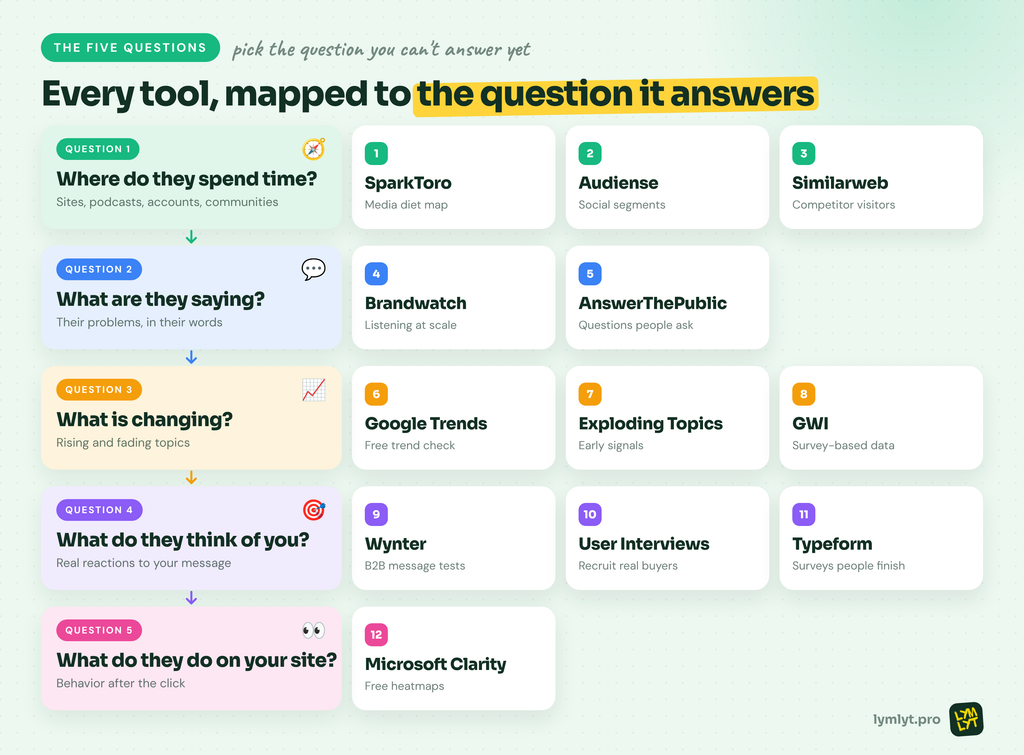
Every useful audience research project answers one or more of these questions:
- Where does my audience spend time? The websites, podcasts, YouTube channels, social accounts and communities they actually follow.
- What are they saying? The complaints, questions and language they use when they talk about the problem you solve.
- What is changing? Which topics, needs and behaviors are rising or fading.
- What do they think of us? How real buyers react to your message, your positioning and your pages.
- What do they do when they arrive? How visitors behave on your site once you have their attention.
The tools below are grouped by these five questions. Skip to the question you cannot answer today.
What marketers should look for
Data you can act on. A chart that says “your audience likes technology” is useless. Good audience research tools name specific sources: this podcast, that subreddit, this newsletter. If you cannot turn the output into a media plan or a content brief by Friday, the tool is decoration.
B2B coverage. Many audience tools are built on consumer data. That works if you sell to consumers. If you sell to a VP of Finance at a mid-market company, check how the tool finds and verifies professional audiences before you pay.
Honest sample sizes. Niche B2B audiences are small. A tool that returns confident percentages for a 300-person audience is guessing. The better tools tell you when the sample is too thin.
Price that matches the question. Some of the best audience research tools are free. Others run to tens of thousands a year. Match the spend to how often you will actually ask the question.
The 12 audience research tools at a glance
| # | Tool | Question it answers | Best for | Starting price | Free option |
|---|---|---|---|---|---|
| 1 | SparkToro | Where they spend time | The sites, podcasts and accounts your audience follows | Business $150/mo | 3 previews/mo |
| 2 | Audiense | Where they spend time | Segmenting social audiences into clusters | Sales-quoted | Limited |
| 3 | Similarweb | Where they spend time | Who visits competitor sites and what else they visit | From $125/mo | Free data and trial |
| 4 | Brandwatch | What they say | Social listening at scale | Sales-quoted | No |
| 5 | AnswerThePublic | What they say | Search questions as content ideas | $10/mo, billed yearly | Daily free searches |
| 6 | Google Trends | What’s changing | Is a topic rising or fading? | Free | Yes |
| 7 | Exploding Topics | What’s changing | Spotting topics before they peak | $39/mo | 7-day trial |
| 8 | GWI | What’s changing | Survey-based audience data across markets | Sales-quoted | No |
| 9 | Wynter | What they think of you | Testing B2B messaging with verified buyers | Pay-as-you-go per test | No |
| 10 | User Interviews | What they think of you | Recruiting real people for interviews | $49/session | Trial |
| 11 | Typeform | What they think of you | Surveys people actually finish | From $39/mo | Yes |
| 12 | Microsoft Clarity | What they do on your site | Free heatmaps and session recordings | Free | Yes |
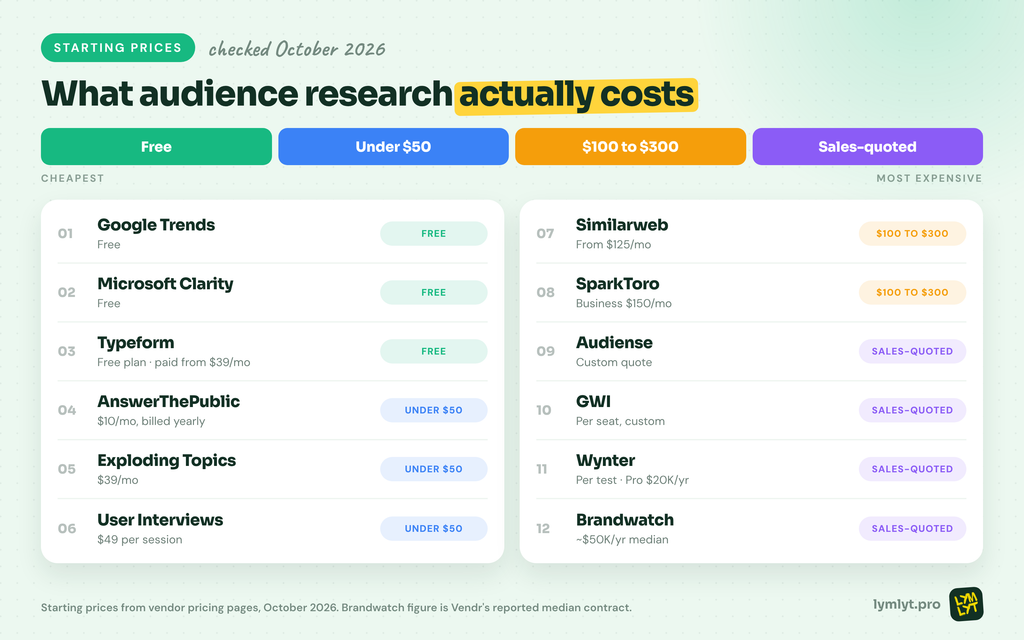
Prices checked on vendor pricing pages in October 2026. Confirm before you buy.
Question 1: Where does your audience spend time?
This is the question most teams skip, and the one that decides where your content and ad budget should go. These audience research tools show you the sources your buyers follow, so you can show up there instead of guessing.
1. SparkToro
Best for: Content and demand gen teams who want to know which websites, podcasts, YouTube channels and social accounts their audience follows.
Price: Free plan with 3 previews a month. Personal is annual only. Business is $150/mo and Agency $300/mo (SparkToro pricing).
What you give it: A topic, a website, a social account or a search keyword your audience cares about.
Free option: Yes, but preview data only.
SparkToro is the closest thing to a map of your audience’s media diet. Type in what your buyers care about, and it shows the sites, podcasts, YouTube channels and social accounts that audience engages with far more than average. It also shows the keywords they search, the social networks they over-index on, and their Reddit subscriptions.
For B2B teams, this is where a guest post list, a podcast tour or a sponsorship plan should start. Instead of pitching the biggest marketing podcast, you find the mid-sized show your exact buyers listen to. Pair it with our content distribution playbook and you have a channel plan grounded in data.
Skip it if: Your audience is so niche that a few dozen accounts cover the whole market, and you already know them by name.
2. Audiense
Best for: Brand and social teams who want to split a large social audience into distinct segments with different interests.
Price: Sales-quoted. Third-party listings have put the older Audience Insights plan at about $696/mo billed annually (TrustRadius), so ask for a current quote.
What you give it: An audience defined by who people follow, what they post about or which brands they engage with.
Free option: Limited. The older Insights product offered three sample reports a month (Audiense help).
Audiense takes a big audience, for example everyone who follows your top three competitors, and groups them into clusters that share interests. One cluster might be developers who follow open-source accounts. Another might be finance leaders who follow economics writers. Each cluster gets its own profile of interests, influencers and media.
Its current product, Audiense Discover, draws on data patterns from Instagram, X, Facebook, LinkedIn and TikTok, according to Audiense. That makes it useful when one “audience” is really three groups who need three different messages.
Skip it if: Your total addressable audience is a few thousand people and you do not run social ads at scale.
3. Similarweb
Best for: Marketers who want to see who visits competitor websites, where that traffic comes from and what else those visitors browse.
Price: Web intelligence plans from $125/mo, with business and enterprise plans quoted by sales (Similarweb pricing).
What you give it: Your domain and your competitors’ domains.
Free option: Free high-level data on similarweb.com, plus a trial.
Similarweb answers the question from the website side. Enter a competitor’s domain and you see estimated traffic, the channels that drive it, the referring sites, and the other websites that same audience visits. That last part is the audience research gold. If your competitor’s visitors also spend time on two industry publications you have never pitched, that is your next PR target.
It is also a fast way to size a market before a launch. If three competitors pull steady traffic from a community you ignore, our piece on the channels you ignore explains why that gap matters for AI visibility too.
Skip it if: Your competitors get so little traffic that the estimates are mostly noise.
Question 2: What is your audience saying?
Knowing where buyers hang out is half the job. The other half is hearing how they describe their problems in their own words. That language should end up in your headlines, your ads and your content briefs.
4. Brandwatch
Best for: Large brand and insights teams that need to track conversation across social, news, forums and reviews at scale.
Price: Sales-quoted. Vendr reports a median contract of about $50,000 a year across 40 purchases (Vendr).
What you give it: Search queries for your brand, competitors, category terms and the problems you solve.
Free option: No.
Brandwatch is the heavy-duty option for social listening and consumer research. You build queries, and it pulls matching conversations from across the public web, then lets you slice them by sentiment, topic, demographics and time. For audience research, the value is in the unprompted language: what people say about your category when no brand is in the room.
Used well, it tells you which pain points come up most, which competitor complaints keep repeating, and which phrases buyers use. That feeds directly into positioning and into the share of voice numbers leadership asks about.
Skip it if: You are a team of under ten marketers. Manual searches on Reddit, LinkedIn and review sites will get you most of the insight for free.
5. AnswerThePublic
Best for: Content marketers who want to see the questions people ask around a topic, grouped and ready to turn into articles and FAQs.
Price: Starter $10/mo, Growth $49.50/mo and Business $99.50/mo, all billed yearly (AnswerThePublic pricing). Starter includes 100 searches a month.
What you give it: A topic or keyword.
Free option: Yes, a small number of free searches a day.
AnswerThePublic pulls autocomplete data from search engines and arranges it by question type: who, what, why, how, which, and comparisons. Type in “content operations” and you get the questions real people attach to it, from beginner confusion to buying-stage comparisons.
For audience research, this is the cheapest way to hear how your buyers phrase their problems. It is especially useful for planning FAQ sections and answer-first content, which is the format AI answers tend to lift. Our guide to building a SaaS content engine shows where those questions fit in a publishing system.
Skip it if: You already pay for a full SEO suite with question and “People Also Ask” data.
Question 3: What is changing?
Audiences shift. New tools, new regulations and new job titles change what buyers care about. These audience research tools help you spot the shift before your competitors do.
6. Google Trends
Best for: Any marketer who needs to check whether a topic, product category or term is growing, flat or dying.
Price: Free.
What you give it: One to five search terms, a region and a time range.
Free option: Yes, fully free.
Google Trends shows the relative search interest in a term over time, on a scale of 0 to 100, broken down by region. It is the fastest sanity check in marketing. Before you build a campaign around a term, see whether interest is climbing or sliding. Before you rename a product category, compare the old and new terms side by side.
It is also useful for seasonality. Many B2B categories have clear dips in late December and in summer, and clear peaks around budget planning. Our B2B SaaS content calendar guide shows how to plan around those cycles.
Skip it if: Never skip it. It is free and takes 30 seconds.
7. Exploding Topics
Best for: Content strategists and founders who want to find topics, products and terms that are growing fast before they go mainstream.
Price: Entrepreneur $39/mo, Investor $99/mo and Business $249/mo (Exploding Topics pricing).
What you give it: A category to browse, or a term to check.
Free option: A 7-day free trial on each plan. No free plan.
Exploding Topics surfaces terms that show steady growth over time, filtered to remove short spikes. You can browse by category, such as marketing, SaaS or AI, and see which topics are climbing, how long they have been climbing and whether growth is accelerating.
For audience research, it helps answer “what will my buyers care about next quarter?” If a new workflow, regulation or tool category is rising in your space, that is a content opportunity. Writing about it early is how you build topical authority before the topic gets crowded.
Skip it if: Your market moves slowly and the same five problems have driven buying for years.
8. GWI
Best for: Brand, insights and agency teams who need survey-based data on audience attitudes, habits and media use across many markets.
Price: Sales-quoted, priced per seat, with API access priced by usage (GWI pricing).
What you give it: An audience definition, such as job role, age, market or interests, and the questions you want answered.
Free option: No.
GWI is built on survey data rather than scraped behavior. The company says it draws on more than 2 million interviews a year across 50+ markets, with over 15 years of trended data (GWI). You define an audience and explore its attitudes, platform use, purchase drivers and media habits. Its AI analyst, Agent Spark, lets you ask questions in plain language.
Because the data comes from people answering questions, it covers things behavioral tools cannot, such as attitudes, motivations and offline habits. That makes it useful for original research angles and for testing assumptions before a big campaign.
Skip it if: You sell to a narrow professional niche in one or two markets.
Question 4: What does your audience think of you?
This is where most audience research stops too early. You can know everything about your buyers and still write a homepage they do not understand. These audience research tools put your actual message in front of real people.
9. Wynter
Best for: B2B SaaS marketers who want verified buyers in their ICP to react to messaging, homepages and positioning.
Price: Pay-as-you-go per test, priced by audience size and seniority. Subscriptions start at $20,000/yr for the Pro plan, and pay-as-you-go tests cost about 50% more than on a subscription (Wynter pricing).
What you give it: A page, message or concept, and the job titles and company types you want feedback from.
Free option: No.
Wynter is built for B2B message testing. You upload a page or message, choose your audience, and verified professionals read it and score it for clarity, relevance, value and differentiation. Wynter says its panel has 86,000+ B2B professionals, each verified by corporate email and LinkedIn, and results arrive in under 48 hours (Wynter).
The feedback is line by line, so you see exactly where a CFO got confused or where a developer rolled their eyes. For homepage and landing page work, this is the fastest way to replace internal opinions with buyer reactions. Our guide to writing homepage content that converts pairs well with a test like this.
Skip it if: You have not written a draft worth testing yet. Fix the obvious problems first.
10. User Interviews
Best for: Teams who want to recruit real people, including B2B professionals, for interviews, usability tests and research calls.
Price: Pay-as-you-go recruiting from $49 per session, with lower per-session rates on annual plans and extra fees for advanced B2B targeting (User Interviews pricing).
What you give it: A screener survey describing who you want to talk to, and the time slots you have available.
Free option: Free trial. No free plan.
User Interviews handles the hardest part of qualitative research: finding the right people and getting them on a call. You write a screener, it recruits matching participants from its panel, handles scheduling and pays the incentives. You can also manage your own customer list as a research panel.
Nothing beats a 30-minute conversation with a buyer for understanding why they chose, what they compared and what almost stopped them. Those interviews also make the best raw material for case studies. Our guide to running a case study interview works just as well for audience research calls.
Skip it if: You already have a customer base willing to talk to you. Start there for free.
11. Typeform
Best for: Marketers running surveys for audience research, onboarding questions or original research reports.
Price: Basic from $39/mo billed monthly, or $28/mo billed yearly, with Plus and Business tiers above (Typeform pricing). The pricing page showed two sets of prices when we checked, so confirm at checkout.
What you give it: Your questions, your logic and a link to share.
Free option: Yes, a limited free plan.
Typeform shows one question at a time, which makes surveys feel shorter and tends to keep people going. Logic jumps let you ask different follow-ups based on earlier answers, so a marketer and a founder get different paths through the same survey.
For audience research, use it in three places: a short survey to your newsletter list, a one-question “what almost stopped you?” form after signup, and a larger survey for an original research report. That last one doubles as a content asset. Your newsletter is the easiest place to send it, and our guide to B2B newsletter success covers how to grow that list.
Skip it if: You only need a quick internal poll. A free form tool will do.
Question 5: What does your audience do on your site?
The last question is about behavior. Once buyers arrive, do they read, scroll, click or leave? This is where you check whether everything you learned upstream actually lands.
12. Microsoft Clarity
Best for: Any team that wants free heatmaps and session recordings without traffic limits.
Price: Free. Microsoft describes it as “free forever” with “no limits on traffic” (Microsoft Clarity).
What you give it: A tracking snippet on your site.
Free option: Yes, fully free.
Microsoft Clarity records real visitor sessions and builds heatmaps of where people click, scroll and drop off. It flags moments like rage clicks and dead clicks, and its AI summaries turn a pile of recordings into a short list of takeaways.
For audience research, Clarity answers the question every other tool on this list cannot: what your audience does once they reach you. If the persona research says buyers care about integrations, but nobody scrolls to the integrations section, you have learned something. It is also a cheap way to check landing page changes after a message test.
If you want on-site surveys and feedback widgets next to recordings, Hotjar now sits inside Contentsquare, which has a free plan and paid plans from $39/mo (Contentsquare pricing).
Skip it if: Your site gets so little traffic that there is nothing to watch yet.
The free tier reality
You can do a surprising amount of audience research for free. Here is how the free options really break down.
Actually usable free: Google Trends and Microsoft Clarity are fully free with no meaningful limits. Typeform’s free plan is enough for a small survey.
Free enough to evaluate: SparkToro’s free previews, AnswerThePublic’s daily searches and Similarweb’s public data show you what the tool does, but not enough to build a plan on.
Trials in disguise: Exploding Topics, User Interviews and Similarweb’s paid features offer trials, then you pay.
No free option: Brandwatch, GWI, Wynter and current Audiense plans are sales-led or pay-per-test.
The cheapest serious stack is Google Trends, AnswerThePublic Starter, SparkToro, Typeform and Clarity. That covers four of the five questions for well under $200 a month at the prices above, depending on the SparkToro plan you pick.
A one-week audience research sprint
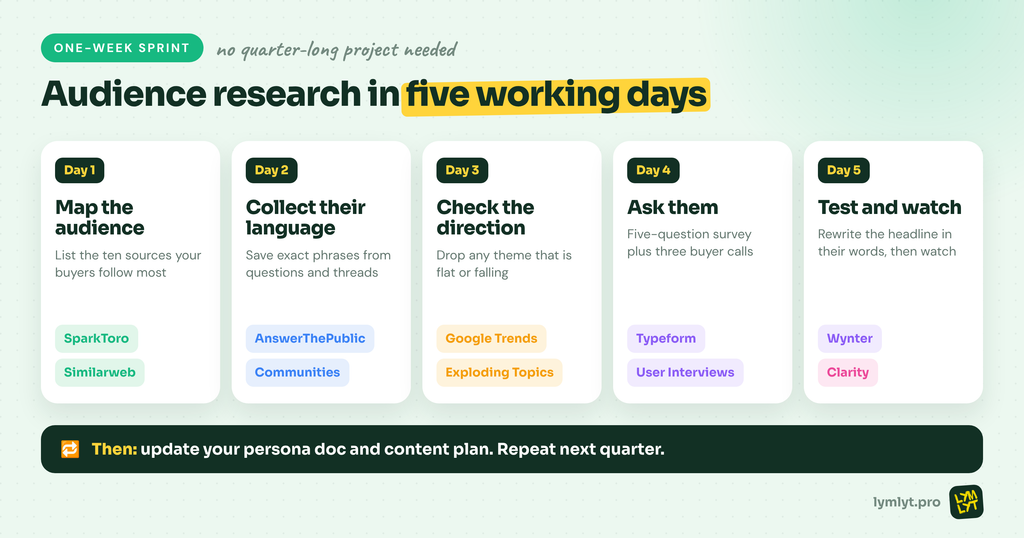
You do not need a quarter-long project. Here is a sprint a small team can run in one week.
Day 1: Map the audience. Run your category, top competitor and a key customer’s website through SparkToro and Similarweb. List the ten sources your audience follows most.
Day 2: Collect their language. Pull questions from AnswerThePublic and read the top threads in the two or three communities SparkToro surfaced. Save exact phrases, not summaries.
Day 3: Check the direction. Run your top five themes through Google Trends and Exploding Topics. Drop anything that is flat or falling.
Day 4: Ask them. Send a five-question Typeform survey to your list, and book three calls with customers or through User Interviews.
Day 5: Test and watch. Rewrite your homepage headline in their words, test it with Wynter if you have budget, and watch a week of Clarity recordings on the page.
At the end, update your persona doc and your content plan. Our guide to B2B SaaS comparison pages is a good next step if the research shows buyers comparing you to a specific competitor.
How to choose
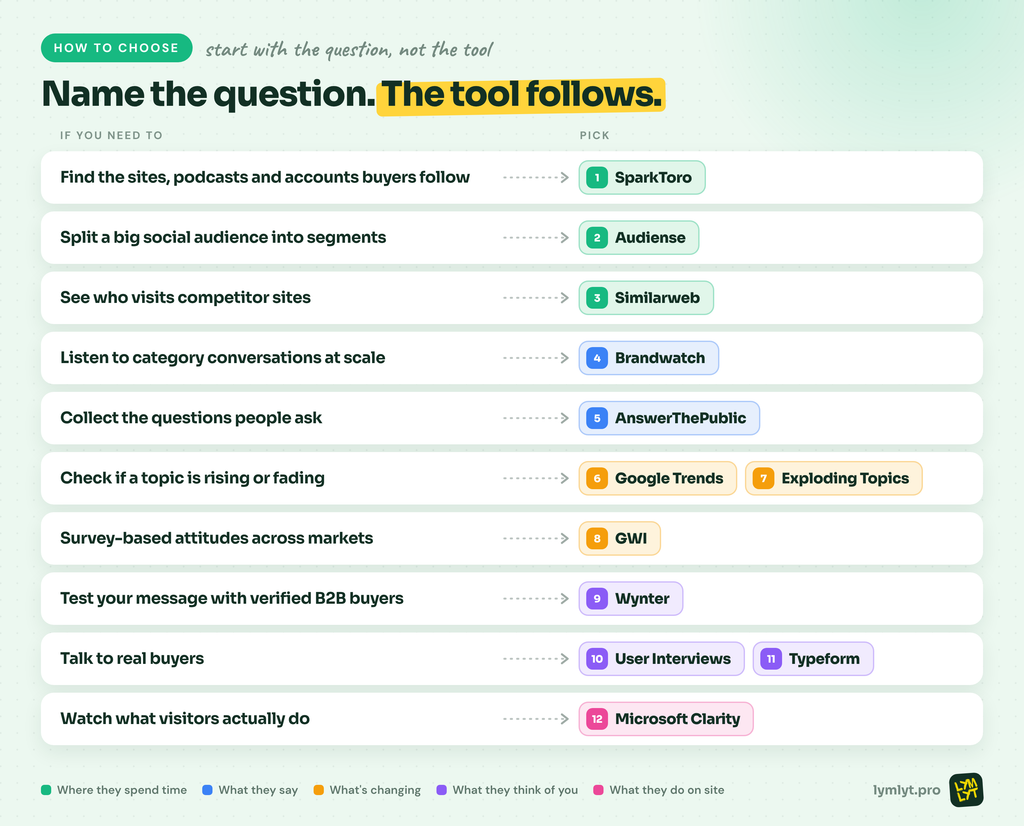
- Find the podcasts, sites and accounts your buyers follow: SparkToro
- Split a big social audience into segments: Audiense
- See who visits competitor sites and what else they browse: Similarweb
- Listen to category conversations at scale: Brandwatch
- Collect the questions people ask: AnswerThePublic
- Check if a topic is rising or fading: Google Trends, Exploding Topics
- Survey-based attitudes across markets: GWI
- Test your message with verified B2B buyers: Wynter
- Talk to real buyers: User Interviews, Typeform
- Watch what visitors actually do: Microsoft Clarity
The bottom line
The best audience research tools do not replace talking to customers. They tell you who to talk to, where to find them and what to ask. Start with the question you cannot answer today. For most B2B teams, that is “where does my audience actually spend time?” or “does my message make sense to them?”
Pick one tool for that question, run the one-week sprint, and update your persona doc with what you learn. Then do it again next quarter, because your audience will have moved. When the research shows that buyers trust peers and communities more than your website, our piece on recommendations that never appear in your CRM explains what to do about it.
If you want help turning audience research into content your buyers actually read.

Jay is the co-founder of LymLyt and an AI partnership consultant helping B2B SaaS companies grow through content strategy, SEO, and AI integration. He writes about content marketing, what makes B2B content convert, and how SaaS teams can build content systems that drive real pipeline.