Do AI Crawlers Render JavaScript? The Honest Answer
AI crawlers render JavaScript far less than most teams assume, and the gap between what Google sees and what ChatGPT sees on the same page is bigger than most technical SEO audits check for. A page can sit at position one on Google and be an empty shell to the AI engines increasingly deciding what your buyers see before they ever click a link. If your brand has already run into this without knowing the cause, our piece on 5 reasons your site doesn’t show up in ChatGPT covers the other common failure modes alongside this one.
Here is the honest answer, the actual data behind it, and how to check your own site in about two minutes.
The Short Answer
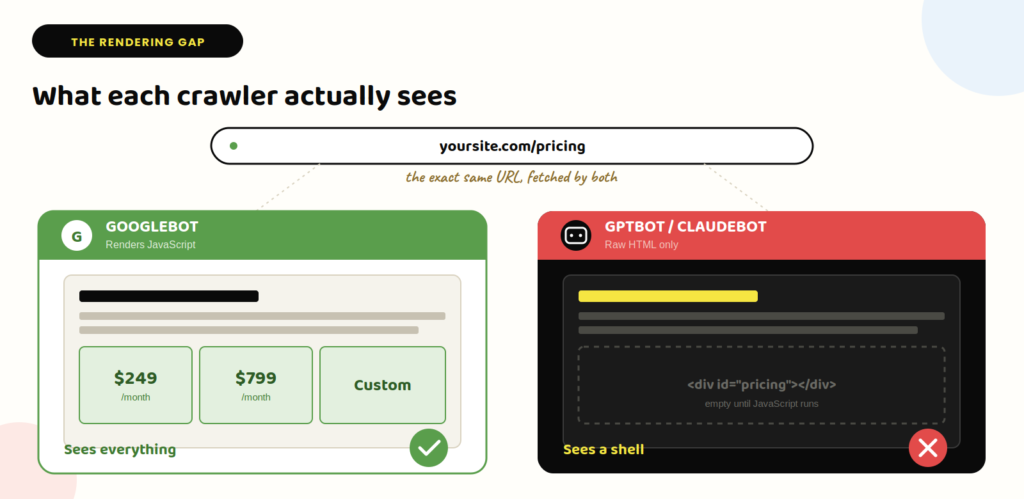
No. Google’s crawler renders JavaScript. Almost none of the AI crawlers do.
GPTBot, ClaudeBot, and PerplexityBot fetch the raw HTML response and extract text from it. If your content, pricing, or feature comparisons get painted onto the page by React, Vue, or Angular after the initial load, these crawlers never see it. They already left.
The distinction that matters here, and the one most technical SEO audits skip entirely: crawling is not rendering. A crawler can successfully fetch your page, return a 200 status, and still never see the content that only exists after JavaScript executes. Your server logs will show a successful visit. Your actual visibility can still be zero. Traditional SEO tools check whether a page was crawled. They don’t tell you whether an AI engine could actually read what’s on it.
Where This Comes From
The core evidence is a server-log study Vercel ran with MERJ, published December 17, 2024, based on monitoring nextjs.org plus two additional sites on different tech stacks over several months. The finding: none of the major AI crawlers tested executed JavaScript, including OpenAI’s GPTBot, OAI-SearchBot, and ChatGPT-User, Anthropic’s ClaudeBot, Meta’s crawler, ByteDance’s Bytespider, and PerplexityBot. GPTBot fetched JavaScript files in roughly 11.5% of requests and Claude in roughly 23.8%, but neither one ran them.
That study is now over a year old, and much of the 2026 content citing it treats it as fresh. It still matters because independent research has since reached a similar conclusion. A June 2026 academic paper on SSRN by Joshua Gutierrez compared raw HTTP fetches with fully rendered versions of 405 small business and B2B websites. Of the 368 sites with usable captures, 25% had at least one answer-critical element visible in the rendered version but missing from the raw fetch.
The one confirmed exception is Gemini. Because it runs on Google’s own crawling infrastructure rather than a separate system, it inherits Googlebot’s full JavaScript rendering.
What This Actually Costs You
If your marketing site, pricing page, or comparison content is client-side rendered, here’s what that means in practice for each engine:
- ChatGPT and Claude get the raw HTML your server sends before any JavaScript runs. Anything injected afterward, pricing tables, feature grids, dynamically loaded testimonials, doesn’t exist to them.
- Perplexity behaves the same way.
- Gemini sees the fully rendered page, the same as a human visitor.
- Google’s traditional search index also sees the fully rendered page, which is exactly why a site can rank fine on Google and be functionally invisible everywhere else.
This is the least glamorous, most overlooked layer in the AI visibility conversation. Our complete guide to AI visibility for B2B SaaS covers the strategic and content side; this is the technical floor underneath all of it. A perfectly written, perfectly sourced article does nothing for GEO if the crawler never receives the words.
How to Check Your Own Site in Two Minutes
You don’t need an audit tool for the first pass.
- Open the page in your browser and find a sentence you know is on it, ideally something specific like a pricing figure or a feature name.
- View the page source (Ctrl or Cmd + U), not the rendered DOM via Inspect Element, the actual raw HTML response.
- Search for that sentence in the source.
- If it’s there, a non-rendering crawler can read it. If it isn’t, that content only exists after JavaScript runs, and GPTBot, ClaudeBot, and PerplexityBot never see it.
For a more precise check, curl the URL directly and grep for the same text, which shows you exactly what a non-browser request receives with zero rendering involved. A dedicated AEO monitoring tool can automate this check on an ongoing basis once you’re past the manual first pass.
The Fix
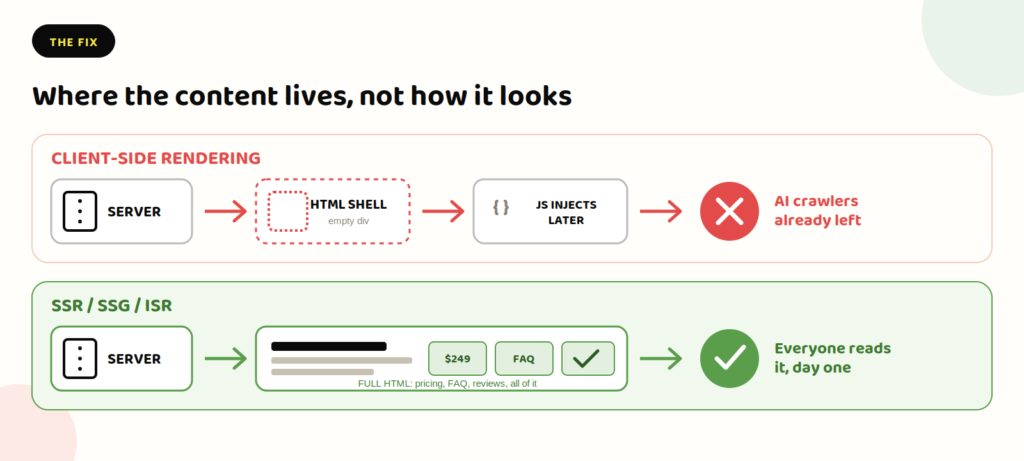
The Vercel/MERJ research is direct about this: server-side rendering, incremental static regeneration, or static site generation keep content accessible to every crawler, rendering or not. This doesn’t mean abandoning a modern JavaScript framework. It means making sure the content that matters, articles, pricing, comparisons, meta titles and descriptions, navigation, ships in the initial HTML response rather than being assembled client-side afterward. Client-side rendering is still fine for things that don’t need to be cited: view counters, chat widgets, non-essential interactive polish.
Two supporting practices matter almost as much as rendering itself. First, keep your sitemap and URL structure clean; the same Vercel data found AI crawlers spend over a third of their fetches hitting 404 pages and outdated redirects, well above Googlebot’s rate, which wastes the limited crawl budget they do allocate to your site. Second, verify crawler identity by IP range rather than user-agent string if you’re doing anything conditional based on which bot is requesting a page, since user-agent headers can be spoofed and published IP ranges can’t. Rendering is the floor; our B2B SaaS SEO strategy guide covers the foundational work that sits on top of it.
Frequently Asked Questions
Can I just block AI crawlers instead of fixing rendering? You can, using robots.txt rules or a firewall rule targeting each crawler’s user agent. But that trades one invisibility problem for a different one: blocked crawlers can’t cite you at all, rendering-blind crawlers might still catch content that happens to load in the initial HTML. Model the traffic tradeoff before blocking anything.
Does this affect Google’s AI Overviews too? No, because AI Overviews are generated from Google’s own index, which is built from the fully rendered page. This rendering gap is specific to the standalone AI assistants: ChatGPT, Claude, and Perplexity.
Is this the same issue as slow page speed? No. A fast, client-side-rendered page and a slow, client-side-rendered page are both invisible to a non-rendering crawler in the same way. Speed affects whether a renderer waits around; it does nothing for a crawler that was never going to render the page in the first place.
How do I know if my specific CMS or framework is affected? Any framework that assembles page content in the browser after load (client-side React, Vue, or Angular without server rendering) is affected. Statically generated sites, server-rendered sites, and most traditional WordPress setups generally are not, since their HTML already contains the full content before JavaScript runs.
If you want a second opinion on whether your own site’s content is actually reaching AI crawlers.

Jay is the co-founder of LymLyt and an AI partnership consultant helping B2B SaaS companies grow through content strategy, SEO, and AI integration. He writes about content marketing, what makes B2B content convert, and how SaaS teams can build content systems that drive real pipeline.