The 10 Best Task Management Tools for Marketers in 2026
Marketing work does not fail because people are lazy. It fails in the gaps: the brief nobody approved, the design stuck with one reviewer, the launch date three people remember differently. The right task management tools for marketers close those gaps. They put every request, deadline, asset and approval in one place your whole team can see.
The problem is that almost every tool claims to do this, and the wrong pick creates more admin than it removes. Asana’s 2021 Anatomy of Work Index found knowledge workers spend 60% of their time on “work about work” like status updates and chasing information, according to its survey of more than 13,000 knowledge workers (Asana). A heavyweight tool on a three-person team just adds to that pile.
So this list is sorted by the job you need done, not by brand size. Pick the job that matches how your team actually works, then pick the tool built for it. If your bottleneck is the content plan itself, our guide to building a B2B SaaS content calendar is a good companion.
Try our FREE AI visibility checklist
What marketers need from a task manager
Marketing teams are not engineering teams. Their work runs on deadlines, approvals and lots of creative files, and it pulls in people who are not marketers at all: sales, product, legal, freelancers and agencies. That changes what a good tool looks like.
Most generic task tools handle “who is doing what by when” well. Fewer handle the marketing-specific parts: intake requests from other teams, review and approve creative, see campaigns on a timeline, and report on progress without a weekly status meeting. Those are the features this list weighs most.
The job also depends on your setup. A content operations team shipping 30 pieces a month needs different software from a founder and one marketer running everything. Our piece on why B2B SaaS marketers need a content operations engine covers the process side.
What to look for in task management tools for marketers
Intake. Requests should arrive through a form, not a DM. Look for forms that create tasks automatically.
Approvals and proofing. Creative needs review. Built-in proofing saves the email chain of “v7-final-FINAL.pdf.”
Timeline views. Campaigns have dependencies. A timeline or Gantt view shows what slips when one piece is late.
Guest access. Freelancers, agencies and other teams need to see their tasks without a full paid seat.
Price at your team size. Per-seat pricing adds up fast. We priced every tool for a five-person team below.
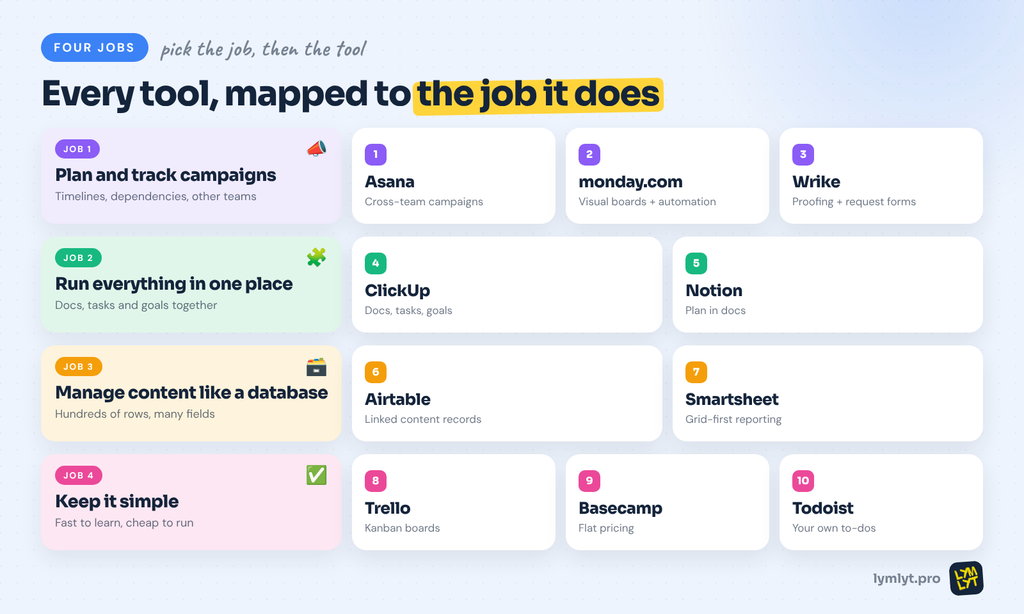
The 10 task management tools at a glance
| Tool | Job | Best for | Starting price | Free plan |
|---|---|---|---|---|
| Asana | Plan and track campaigns | Cross-team campaign planning | Starter $10.99/user/mo (annual) | Yes, up to 2 users |
| monday.com | Plan and track campaigns | Visual boards with automations | Basic $9/seat/mo (annual) | Yes, up to 2 seats |
| Wrike | Plan and track campaigns | Creative review and request intake | Team $10/user/mo (annual) | Yes |
| ClickUp | One workspace | Docs, tasks and goals in one tool | Unlimited $7/user/mo (annual) | Yes |
| Notion | One workspace | Teams that plan in docs | Plus $10/member/mo | Yes |
| Airtable | Content as a database | Content calendars with real data | Team $20/seat/mo (annual) | Yes, 1,000 records per base |
| Smartsheet | Content as a database | Spreadsheet-minded teams | Pro $9/member/mo (annual) | No |
| Trello | Keep it simple | Kanban boards for small teams | Standard $5/user/mo (annual) | Yes, up to 10 collaborators |
| Basecamp | Keep it simple | Flat pricing with clients and freelancers | Freelancer $29/mo flat | Yes, 1 project |
| Todoist | Keep it simple | Solo marketers and personal to-dos | Pro $5/mo (yearly) | Yes |
Prices checked on vendor pricing pages in October 2026. Confirm before you buy.
Job 1: Plan and track campaigns
These three are built for teams running several campaigns at once, with timelines, dependencies and other departments in the loop.
1. Asana
Asana is the default choice for marketing teams that coordinate with sales, product and design. Projects can be viewed as a list, board, calendar or timeline, and portfolios roll campaigns up so a marketing lead can see every launch in one view. Forms turn requests from other teams into tasks automatically.
The features marketers care most about sit on Advanced: approvals and proofing, goals, unlimited portfolios and branching forms, according to Asana’s pricing page. Starter covers timeline and Gantt views plus forms, which is enough for many small teams. AI is included on paid plans with a monthly request allowance.
Price: Personal is free for up to 2 users. Starter is $10.99/user/mo billed annually ($13.49 monthly). Advanced is $24.99/user/mo billed annually ($30.49 monthly) (Asana pricing).
Best for: Marketing teams that run campaigns across several departments and need one view of every launch.
Skip it if: You are a team of one or two. Asana’s structure pays off at scale, and feels heavy below it.
2. monday.com
monday.com is the most visual of the campaign planners. Everything lives on colourful boards, and each board can switch between table, Kanban, calendar and timeline views. Its strength is automation: “when status changes to approved, notify the designer” takes a minute to set up.
Timeline and Gantt views, automations and integrations start on Standard. Pro adds time tracking, private boards and 25,000 automation and integration actions a month, according to monday.com pricing. AI credits are included from Basic. Its FAQ says plans start from 3 users, so budget for at least three seats.
Price: Free for up to 2 seats. Basic is $9/seat/mo, Standard $12 and Pro $19, billed annually (monday.com pricing).
Best for: Teams that want a visual campaign board and lots of no-code automation.
Skip it if: You need Gantt views on a tight budget. They start on Standard, not Basic.
3. Wrike
Wrike is the campaign planner with the strongest creative review. Its marketing page describes side-by-side file version comparison, reviewers who can approve or request changes, request forms with conditional logic and an Adobe Creative Cloud extension for Photoshop, Illustrator and InDesign. That makes it a natural fit for teams with in-house designers.
Wrike also ships campaign, event and marketing calendar templates, and AI agents can follow up on stalled approvals. Interactive Gantt charts and dashboards start on Team.
Price: Free plan available. Team is $10/user/mo for 2 to 15 users, and Business is $25/user/mo for 5 to 200 users, billed annually (Wrike pricing).
Best for: Marketing teams with designers who need proofing and approvals inside the task tool.
Skip it if: Your team rarely produces creative assets. You would be paying for review tools you do not use.
Job 2: Run everything in one workspace
These tools combine tasks with docs, wikis and goals, so briefs, plans and to-dos live side by side.
4. ClickUp
ClickUp tries to replace your task manager, docs, whiteboards and chat in one app. Marketing teams use it to keep briefs, content calendars, campaign tasks and goals in one place. Views include list, board, calendar and, on paid plans, Gantt.
The Unlimited plan adds Gantt charts, goals, portfolio management and unlimited forms. Business adds advanced dashboards and timesheets. AI is an add-on, with Brain AI at $9/user/mo, according to ClickUp pricing. The trade-off is complexity: ClickUp can do almost anything, so it takes discipline to set up simply.
Price: Free Forever plan. Unlimited is $7/user/mo billed yearly ($10 monthly). Business is $12/user/mo billed yearly ($19 monthly) (ClickUp pricing).
Best for: Teams that want one tool for docs, tasks and goals, and have someone to own the setup.
Skip it if: You want something that works out of the box with zero configuration.
5. Notion
Notion started as a docs tool and grew into a flexible workspace. Marketers build content calendars, campaign trackers and brand wikis as linked databases, so a brief, its tasks and the published piece all connect. It is the best fit for teams that think in documents first.
Business includes Notion Agent, which completes multi-step tasks, plus AI meeting notes and enterprise search. Free and Plus get an AI trial only, according to Notion pricing. Task features like dependencies and timelines exist but are lighter than in Asana or Wrike. A good content brief template is a natural first page to build.
Price: Free plan available. Plus is $10/member/mo and Business $20/member/mo, with up to 20% off on yearly billing (Notion pricing).
Best for: Teams that plan in docs and want their wiki, briefs and tasks connected.
Skip it if: You need proofing, workload planning or heavy cross-team reporting.
Job 3: Manage content like a database
When your content calendar has hundreds of rows with owners, stages, keywords and channels, a database beats a to-do list.
6. Airtable
Airtable looks like a spreadsheet and works like a database. Marketing teams use it for content calendars with linked records: each piece links to its campaign, keyword, author and channel, and the same data shows as a grid, calendar, Kanban or gallery.
Only users with edit permissions pay. Read-only collaborators, form submissions and share links are free, according to Airtable pricing. The free plan caps bases at 1,000 records, 5 editors and 100 automation runs a month (Airtable support), which a busy content team will outgrow fast.
Price: Free plan available. Team is $20/seat/mo billed annually ($24 monthly). Business is $45/seat/mo billed annually (Airtable pricing).
Best for: Content teams that track lots of structured data per piece and want custom views for each role.
Skip it if: You want classic task features like subtasks and dependencies out of the box.
7. Smartsheet
Smartsheet is the pick for marketing teams that live in spreadsheets and answer to operations or finance. It looks like a grid but adds Gantt views, forms, automated workflows and approval requests. Business adds proofing and conditional form logic, according to Smartsheet pricing.
It suits larger marketing departments that need to report campaign status upward in a format executives already understand. Pro includes unlimited contributors and Business adds unlimited guests, which helps when agencies and other teams are involved.
Price: No free plan. Pro is $9/member/mo billed yearly ($12 monthly) for 1 to 10 members. Business is $19/member/mo billed yearly ($24 monthly) for 3+ members (Smartsheet pricing).
Best for: Spreadsheet-minded marketing teams inside larger organizations.
Skip it if: You want a visual, card-based tool. Smartsheet is grid-first.
Job 4: Keep it simple
Not every team needs portfolios and proofing. These three are fast to learn and cheap to run.
8. Trello
Trello is the simplest way to run a marketing Kanban board: columns for each stage, cards for each piece, drag to move. Small teams use it for content pipelines, social calendars and launch checklists. Unlimited Power-Ups add integrations, and no-code automation is built into every board.
Calendar, timeline, table and dashboard views need Premium. The free plan allows up to 10 collaborators and 10 boards per Workspace, according to Trello pricing. That is generous for a small team, but you will hit the board cap quickly with one board per campaign.
Price: Free plan available. Standard is $5/user/mo billed annually ($6 monthly). Premium is $10/user/mo billed annually ($12.50 monthly) (Trello pricing).
Best for: Small marketing teams that want a visual pipeline with almost no setup.
Skip it if: You need reporting or timelines without paying for Premium.
9. Basecamp
Basecamp bundles to-dos, message boards, schedules, docs, chat and card tables into one project, with flat pricing instead of per-seat fees. That makes it popular with marketing teams and agencies that bring clients and freelancers into projects. It was also at the centre of a Google Ads protest we covered on the blog.
Every plan gets the same core tools. Plans differ by number of projects, storage and users, according to Basecamp pricing.
Price: Free for 1 project and 3 users. Freelancer is $29/mo flat for 3 projects and up to 5 users. Pro is $79/mo for up to 10 users, and Pro Unlimited is $199/mo billed annually for unlimited users (Basecamp pricing).
Best for: Teams that work with lots of outside collaborators and hate per-seat pricing.
Skip it if: You need Gantt charts, dashboards or detailed campaign reporting.
10. Todoist
Todoist is a personal task manager first. It is the right pick for a solo marketer, or for anyone who needs their own to-do list on top of the team tool. Quick Add understands natural language, so “send newsletter draft every Thursday 10am” becomes a recurring task.
Business adds a shared team workspace with up to 500 team projects and roles and permissions. The free Beginner plan allows 5 personal projects, according to Todoist.
Price: Beginner is free. Pro is $5/mo billed yearly ($7 monthly). Business is $8/user/mo billed yearly ($10 monthly) (Todoist help center).
Best for: Solo marketers and founders running marketing alongside everything else.
Skip it if: You need campaign timelines, proofing or cross-team visibility.
What a five-person team actually pays
Per-seat prices look small until you multiply them. Here is the monthly cost of each tool’s entry paid plan for a five-person marketing team, on annual billing where offered.
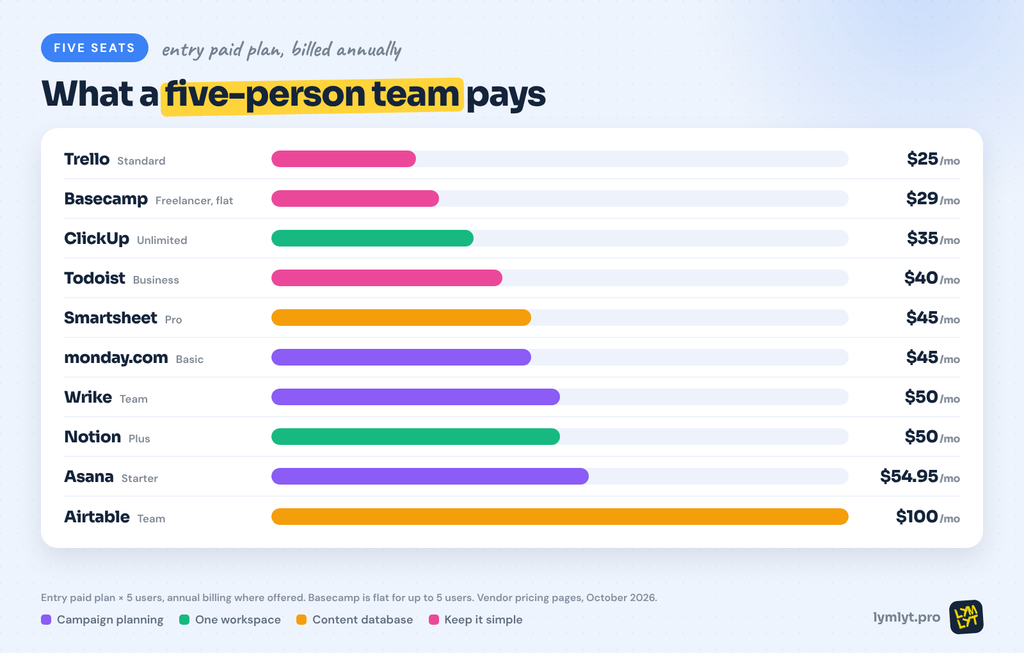
- Trello Standard: $25
- Basecamp Freelancer: $29 flat (up to 5 users)
- ClickUp Unlimited: $35
- Todoist Business: $40
- Smartsheet Pro: $45
- monday.com Basic: $45
- Wrike Team: $50
- Notion Plus: $50
- Asana Starter: $54.95
- Airtable Team: $100
Entry plans do not always include the features marketers want most. Proofing and approvals usually sit one tier up, so price the plan you will actually need.
A marketing workflow, stage by stage
Whatever tool you pick, the setup that works looks the same. Build it once, then copy it for every campaign.
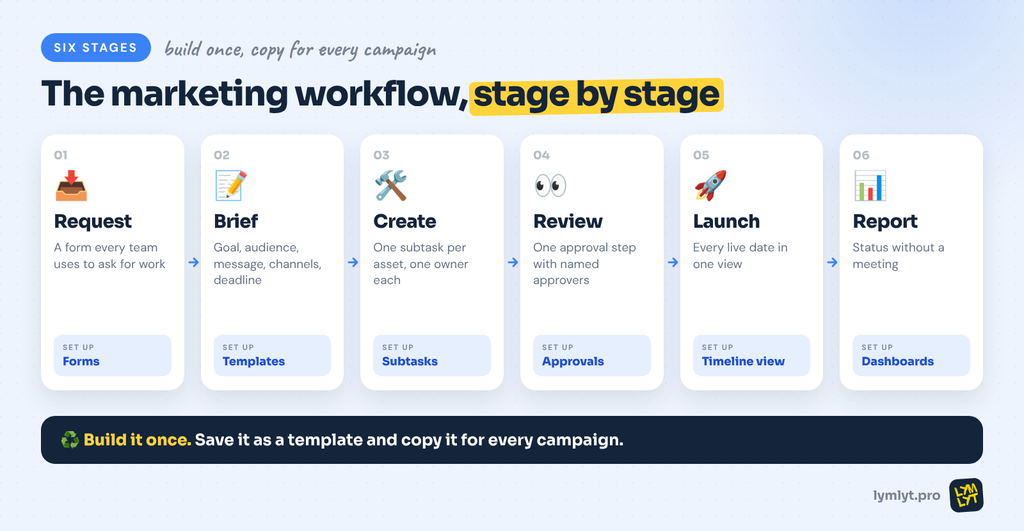
1. Request. A form that every other team uses to ask for work. No form, no task.
2. Brief. A template task or doc with goal, audience, message, channels and deadline. Our guide to writing a content brief covers what to include.
3. Create. Subtasks for each asset, each with one owner and one due date.
4. Review. One approval step, with named approvers. Proofing tools beat email threads.
5. Launch. A calendar or timeline view that shows every live date in one place.
6. Report. A dashboard or status field that answers “where is it?” without a meeting. Our list of SaaS content marketing metrics that matter helps decide what to track.
How to choose
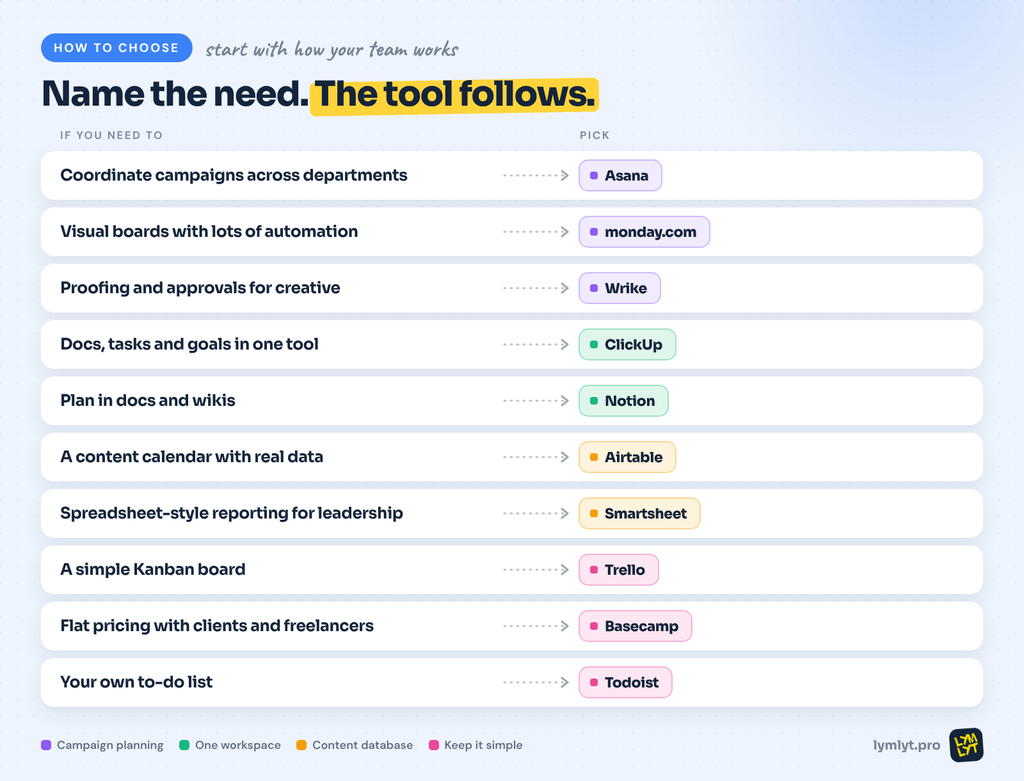
- Coordinate campaigns across departments: Asana
- Visual boards with lots of automation: monday.com
- Proofing and approvals for creative: Wrike
- Docs, tasks and goals in one tool: ClickUp
- Plan in docs and wikis: Notion
- A content calendar with real data: Airtable
- Spreadsheet-style reporting for leadership: Smartsheet
- A simple Kanban board: Trello
- Flat pricing with clients and freelancers: Basecamp
- Your own to-do list: Todoist
The bottom line
The best task management tools for marketers disappear into the work. Nobody asks where a brief is, approvals happen in one place and the launch calendar is the one everybody trusts. Start with the job your team does most.
If it is cross-team campaigns, start with Asana or monday.com. If it is creative review, start with Wrike. If you are small, start with Trello or Basecamp and upgrade when it hurts.
Then set up the six-stage workflow once and copy it for every campaign. The tool matters less than the habit. If your real bottleneck is the content itself, not the tasks around it, our SaaS content engine guide shows how to plan a pipeline worth managing.
If you would rather hand off the content and keep only the approvals, talk to LymLyt.

Jay is the co-founder of LymLyt and an AI partnership consultant helping B2B SaaS companies grow through content strategy, SEO, and AI integration. He writes about content marketing, what makes B2B content convert, and how SaaS teams can build content systems that drive real pipeline.