What are Claude Skills and should marketers care?
Every marketer who uses Claude regularly hits the same wall. You open a new conversation, paste in the brand voice doc, explain the audience, clarify the tone, maybe remind Claude not to use em dashes. And then you do it again tomorrow. And the day after. The context you spent five minutes establishing vanishes the moment the session ends. You are not using AI. You are managing it. Claude Skills exist to fix exactly that.
Claude Skills exist to fix that. They launched in October 2025, got a significant upgrade in early 2026, and are now one of the most underused features available to marketers and founders who use Claude regularly. This article covers what they are, how they work, and whether they are worth your time.
What are Claude Skills, exactly?
A skill is a folder of instructions you build once that Claude loads automatically when the task calls for it. Your preferences, workflows, and domain expertise are embedded in the skill, not re-pasted into every chat.
The folder structure is straightforward. Inside it lives a SKILL.md file (required) and optionally a scripts directory for executable code, a references directory for documentation Claude loads as needed, and an assets directory for templates and supporting files.
Think of it as the difference between briefing a freelancer from scratch every Monday and having a team member who already knows your brand, your process, and your standards. The skill is the institutional knowledge. Claude reads it and applies it without being asked.
What changed with Claude Skills 2.0
The original version of Skills, released in October 2025, was essentially a persistent prompt system. Useful, but limited. The recent update turned Skills into something completely different: full workflow packages. A Skill now bundles together instructions, scripts, templates, and reference materials into one modular unit that Claude executes on demand.
The practical difference is significant. Before, a skill told Claude how to behave. Now, a skill can tell Claude how to behave and actually run the workflow: generating a formatted document, executing a script, producing a real deliverable, not just a text response.
How Claude decides when to use a skill
This is where the architecture gets clever. Claude scans available skills, loads only minimal metadata first, then loads additional files only if the skill is relevant to the active task. This is called progressive disclosure, and it matters because it keeps the context window lean. (The context window is the amount of text Claude can hold in memory during a single conversation. The bigger it gets, the slower and more expensive things become.)
The three levels work like this: YAML frontmatter (YAML is a simple text format used to store settings and metadata, think of it as a structured label on the front of a folder) is always loaded in Claude’s system prompt, costing around 100 tokens per skill regardless of how many skills are installed. This gives Claude just enough information to decide whether the skill is relevant. The SKILL.md body loads when Claude determines the skill is relevant. This contains the full instructions, step-by-step workflows, and examples. Referenced files are additional documents Claude navigates only when the task actually requires them.
In practice: you can have ten skills installed and Claude will only load the one that fits the task at hand, without any manual switching.
The types of skills
There are Anthropic-built skills, created and maintained by Anthropic, such as enhanced document creation for Excel, Word, PowerPoint, and PDF files. These are available to all users and Claude invokes them automatically when relevant. Then there are custom skills: ones you or your organisation create for specialised workflows and domain-specific tasks.
For marketers, the custom skill category is where the real value lives. The Anthropic-built ones handle generic document production. The custom ones handle your specific work: your brand voice, your content formats, your editorial standards, your audience.
What marketers can actually build with Skills
This is the part most articles skip. Let us be specific. A Claude Skill is not a chatbot preset or a saved prompt. It is a fully loaded workflow that fires automatically, applies your standards, and produces output that already looks like your brand made it. The use cases below are not theoretical. They are the ones marketers and founders are actually building right now.
Brand voice and editorial standards
The most immediate use case. Instead of pasting a brand voice document into every session, you encode it into a skill. Claude loads it automatically whenever you ask it to write. The skill can include tone guidance, vocabulary preferences, words and phrases to avoid, sentence length norms, and examples of good and bad output.
For a content team producing ten or more pieces per month, this removes a significant amount of review time. If you have ever worked with an executive ghostwriting agency and noticed how much of the onboarding is just capturing voice and tone, a brand voice skill does the same thing for your internal Claude use, permanently.
Content templates and formats
A skill can carry your article structure, your newsletter format, your social post framework, your case study template. Claude does not just know the format exists. It executes it. You say “write this week’s newsletter” and the output arrives already structured the way you want it, with the sections in the right order and the formatting applied.
SEO and content strategy workflows
If you have a defined process for keyword research, content briefs, internal linking, or on-page optimisation, you can encode that process into a skill. Claude then follows your exact steps every time, without needing prompts that re-explain the methodology. For agencies or founders running a B2B SaaS content engine, this is the difference between a repeatable system and an ad-hoc workflow.
A well-built SEO skill can also enforce topical authority discipline: every brief Claude produces checks whether the piece fills a cluster gap rather than targeting a random keyword. That kind of consistency is hard to maintain manually across a team. A skill enforces it automatically.
Meeting notes and client communications
Other workflows include structuring meeting notes with company-specific formats and generating communications following company email templates. For founders and marketing leads who are also managing client relationships, a skill that formats every client update the same way removes a small but real cognitive load from every week.
Cross-tool task creation
Skills can also create tasks in company tools like JIRA, Asana, and Linear following team conventions. Combined with an MCP connector (MCP, or Model Context Protocol, is a standard that lets Claude connect directly to external tools like your project manager or CRM), a skill can take a content brief and turn it directly into a tracked task without the manual handoff. For teams already using marketing automation tools to handle repetitive workflow steps, Skills slot in as the content layer on top.
See it in action: a brand voice skill, built out
The skill builder below is a working example of what a brand voice skill looks like inside Claude. It shows the actual SKILL.md file structure, the folder layout, a before and after comparison of output with and without the skill active, and a live demo you can type into. Use it as a reference when building your first skill.
How skills work across Claude’s surfaces
One of the more practical aspects of Skills is that they are not tied to a single interface. Skills work identically across Claude.ai, Claude Code, and the API. Create a skill once and it works across all surfaces without modification.
For most marketers working in the Claude.ai web or app interface, the workflow is simple. Download the skill folder, zip it if needed, and upload to Claude.ai via Settings then Capabilities then Skills.
For teams on Team or Enterprise plans, there is an additional layer. Organisation owners can provision skills for all users, which means a marketing ops lead can build a content skill once and deploy it across the entire team. Everyone gets the same brand voice, the same templates, the same standards, with no individual setup required.
Should marketers actually care?
The honest answer is: it depends on how you use Claude.
If you use Claude occasionally for one-off tasks, Skills add complexity without much return. The setup cost is not zero, and a well-written prompt does most of the same work for a single session.
If you use Claude regularly for repeatable work, the calculation flips. Every session where you paste the same brand doc, explain the same audience, or re-establish the same tone preferences is time you are spending to compensate for the absence of a skill. That tax compounds. A content team running ten articles a month and spending five minutes per session on context re-establishment is losing nearly an hour of work every month to a problem Skills solve in a one-time setup of roughly the same length.
For founders specifically, the value is slightly different. Skills are not just about efficiency. They are about consistency. When you are the one writing the briefs, reviewing the output, and maintaining the standard, a skill is a way to encode what “good” looks like so that Claude produces it reliably, not just when you are paying close attention.
The one real limitation
Skills require an upfront investment in documentation. To build a useful skill, you need to articulate your process clearly enough that Claude can follow it without clarification. For teams that have never written a brand voice guide or a content process document, the skill forces that work to happen first. That is not a flaw in Skills. It is a forcing function for work that was probably worth doing anyway. The same thinking applies to building a B2B SaaS content calendar: the discipline of mapping content to pipeline stages before you start publishing is exactly what makes the whole system compound.
How to build a Claude Skill: the actual process
You do not need to write a single line of code. The entire process happens inside Claude, and it takes one conversation.
Here is the real step-by-step, using a marketing content templates skill as the example.
Step 1: Tell Claude what you want the skill to do
Open a new Claude conversation and describe the skill you want. Be specific about what tasks it should handle, what formats it should apply, and what rules it should follow. You are not writing code or filling in a form. You are just explaining the workflow in plain language, the same way you would brief a new hire.
For example: “I want to create a Claude skill called marketing-content-templates. When I or anyone on my team asks Claude to write any kind of marketing content, ads, emails, social posts, landing page copy, briefs, Claude should automatically apply our company’s preferred formats, tone, and structural templates instead of guessing or using generic formats.”
You know what’s much simpler? You can also ask Claude to generate a prompt for you by giving it relevant information as per your requirement.
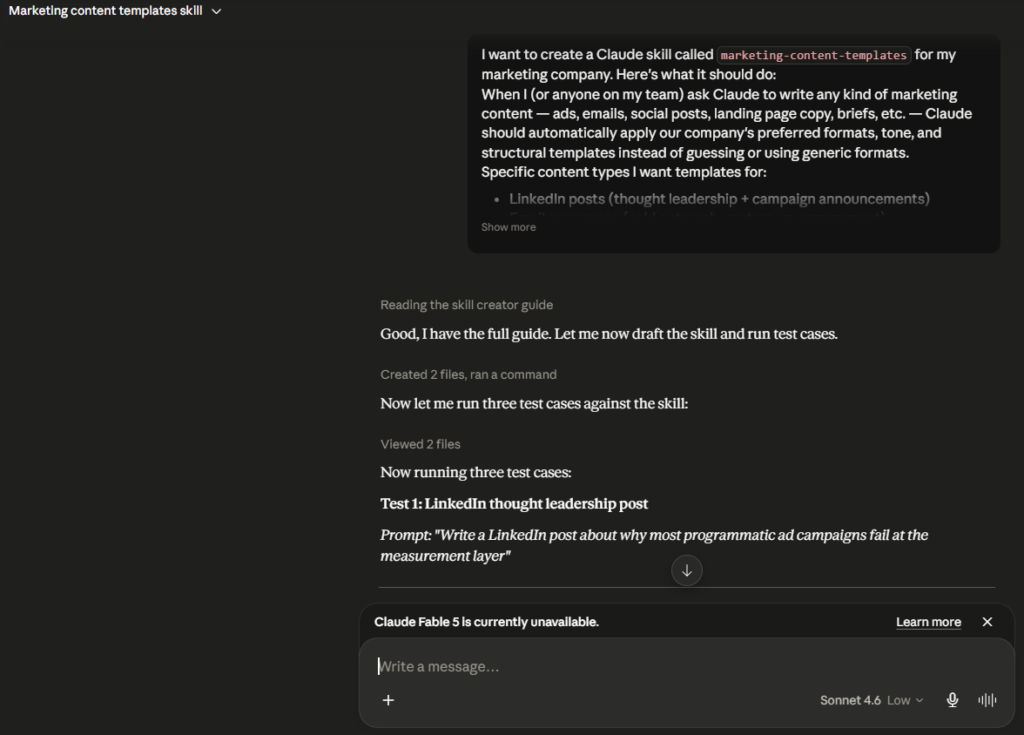
Claude reads the skill creator guide, drafts the skill files, and runs test cases against them automatically. You will see it working through the process step by step: reading guides, creating files, running commands, viewing the output.
Step 2: Claude builds and tests the skill for you
After you describe what you want, Claude does the construction work. It creates the SKILL.md file with the core instructions and trigger rules, builds any reference files needed (such as a templates file containing all your content formats), and then runs test cases against the skill before you ever install it.
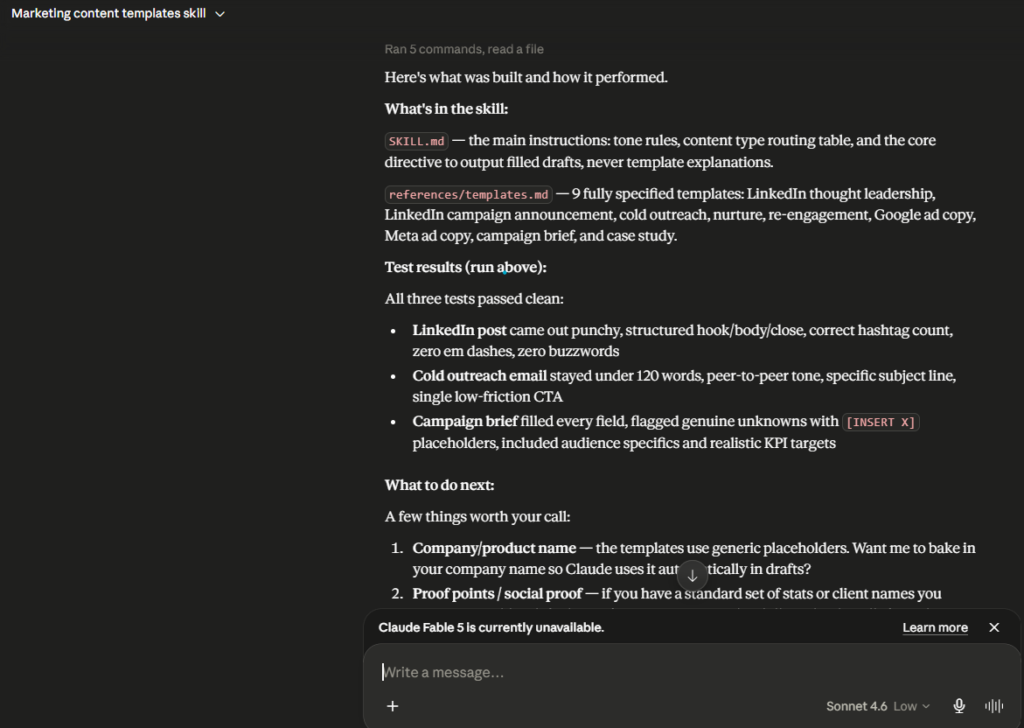
The test results tell you exactly what passed and what needs refinement. In a well-built skill, the output of each test will match the format and tone you specified. If something is off, you tell Claude and it updates the skill files before you download anything.
Step 3: Save the skill
Once Claude has built and tested the skill, it presents a download option directly in the conversation. You will see a card labelled with the skill name and a “Save skill” button. Click it.
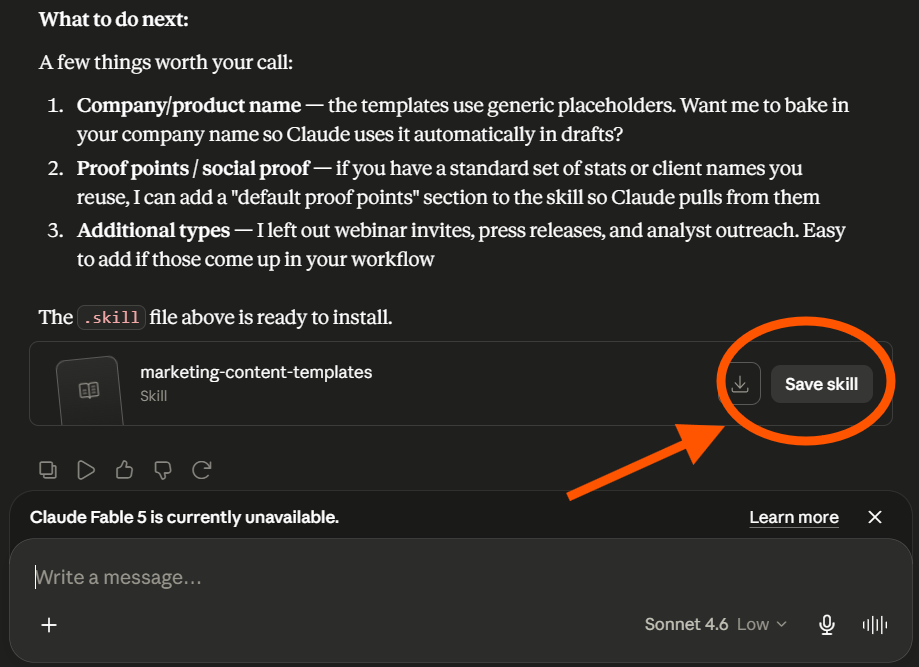
This saves the skill file to your device. No zipping, no file manager, no command line. Claude handles the packaging.
Step 4: Install the skill in Claude
Go to Claude.ai, open Settings, then navigate to Customize and select Skills. You will see a Skills panel with a list of your personal skills and a search and add button at the top. Upload the skill file you just saved.
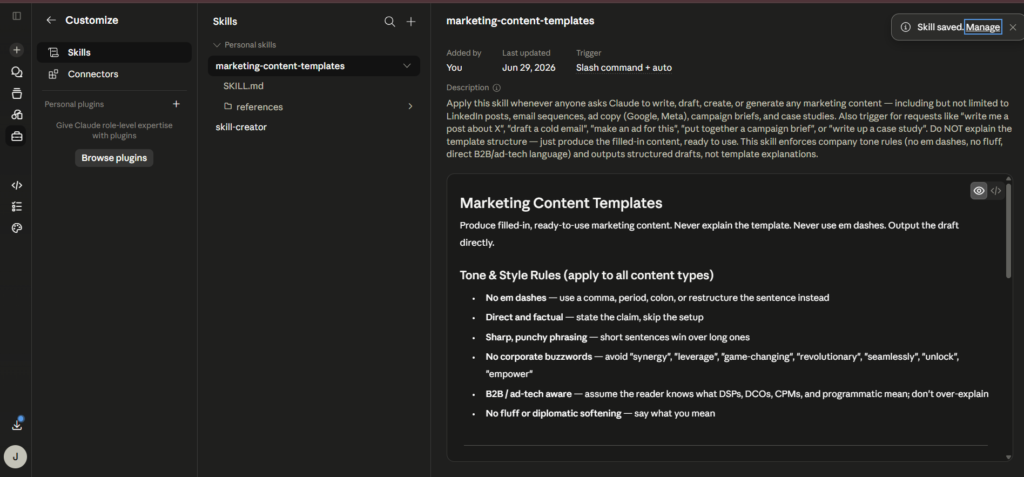
Once installed, the skill shows you its name, when it was added, when it was last updated, and how it triggers. The trigger in the screenshot is set to “Slash command + auto,” which means Claude loads it automatically when the task matches, and you can also invoke it manually with a slash command.
From that point, the skill is live. Every time you ask Claude to write marketing content, it applies your templates, your tone rules, and your editorial standards without you asking it to.
What to refine after the first install
The skill the screenshot shows was built to handle nine content types: LinkedIn thought leadership posts, LinkedIn campaign announcements, cold outreach emails, nurture emails, re-engagement emails, Google ad copy, Meta ad copy, campaign briefs, and case studies. That is a full marketing content stack in a single skill.
After you install and use it, you will notice things the skill does not quite get right yet. Add those to the Gotchas section of the SKILL.md file and re-save. Skills are not set-and-forget. They get more accurate the more you use and refine them.
The teams getting the most value from Skills are not the ones who built elaborate systems on day one. They are the ones who started with one simple skill, refined it over a few weeks, and then built a second one.
The bigger picture
Skills are part of a broader shift in how AI tools are actually useful at work. The early promise of AI was that you could ask it anything and get a useful answer. The reality that emerged was that generic answers are rarely the ones you need. You need answers that fit your brand, your audience, your process, and your standards.
Skills are Anthropic’s structural answer to that gap. Not a better prompt, but a persistent layer of context that travels with every task. For marketers and founders doing repeatable, standards-driven work, that is a meaningful shift. It is the same principle behind SEO content writing done properly: the process matters as much as the output, and a consistent process compounds in ways that one-off effort never does.
The question is not really whether you should care about Claude Skills. The question is which workflow you want to encode first.
If you are building a content operation that needs to be consistent at scale, LymLyt helps B2B SaaS teams build content systems that compound. Book a call.

Jay is the co-founder of LymLyt and an AI partnership consultant helping B2B SaaS companies grow through content strategy, SEO, and AI integration. He writes about content marketing, what makes B2B content convert, and how SaaS teams can build content systems that drive real pipeline.