The Best Slack Alternatives in 2026
If you are looking for Slack alternatives, you are probably feeling exactly this. And you are not wrong to be. We too hate the pings. The dot that turns red the moment you sit down to think. The DM that arrives at 9pm and waits like a small open file in your head until you answer it. The unread badge that says you are behind on a conversation you did not ask to be in. The quiet, low-level dread of opening the app on a Monday morning.
That is what most articles about Slack alternatives never say out loud. Slack works fine. The problem is what it does to your team’s brain.
So here is the honest version of this roundup. Some of the tools below will not fix the anxiety, because they are Slack with a different logo. Most of the famous alternatives, Microsoft Teams, Discord, Mattermost, work the same way and bring the same problems. A few tools genuinely solve this. They are designed against the always-on, real-time, watch-the-green-dot model, and they make the work calmer. Those are the ones we lead with.
This guide covers fourteen alternatives in total, sorted by what they actually do for you, with current pricing checked in May 2026 and a plain “skip it if” line for every one. If your search started with automation tools rather than chat, we have companion guides for Make alternatives and n8n alternatives, plus a broader Top 100 AI Tools list.
Why people actually leave Slack
Not the polite reasons. The real ones.
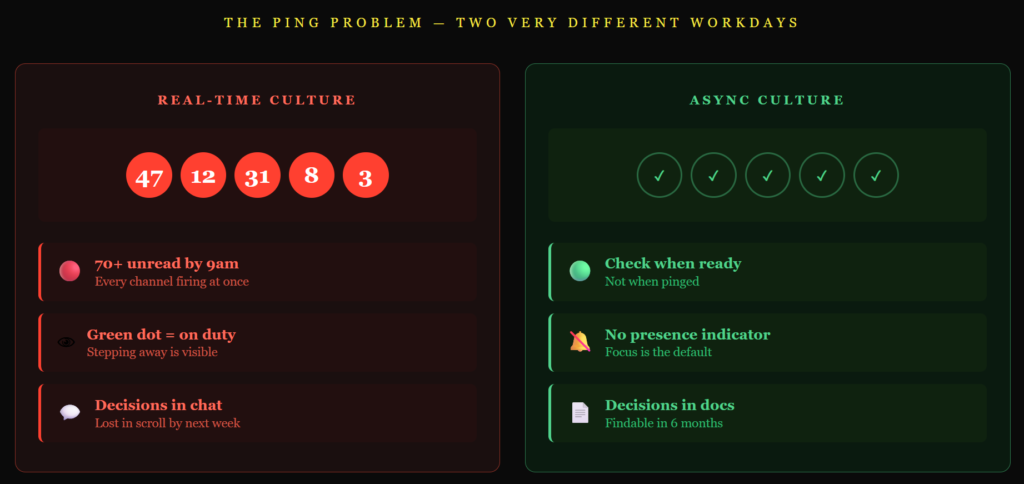
The pings never stop. Slack is built for real-time conversation, and the default behavior is to notify you about almost everything. Even with notification settings tuned aggressively, the cultural expectation that you reply quickly is hard to escape. Some teams call it productivity. It is closer to permanent interruption.
The green dot is a performance. Slack shows when you are online. Teammates check it. You start staying “active” to look like you are working, then feel guilty for stepping away from the keyboard. Status indicators turn presence into theatre.
Important things get buried. Channels balloon. Decisions get lost in scroll. Threads help in theory and confuse in practice. By the time someone needs to find a decision from three months ago, search is unreliable and the context is gone.
The free plan got worse. Slack’s free tier limits message history to 90 days, which means a small team using it as a knowledge base loses access to its own past every quarter. The paid plans climb fast.
Cost. Slack is one of the most expensive tools in this category. For teams who use it mostly for messaging, the per-user pricing is hard to justify against alternatives that match the basics.
Data control. Slack runs on Slack’s servers. For regulated industries, or for teams that simply do not want client conversations sitting on a third-party server, self-hosting becomes a requirement.
Most of those reasons get solved by a different cloud chat app. The first two, the pings and the green-dot anxiety, do not. They get solved by changing how the tool works, or by changing how your team works. That is the whole frame this guide is built on.
The honest thing nobody says about switching
Switching from Slack to Microsoft Teams will not fix this. Switching to Discord will not fix this. Switching to Mattermost will not fix this. Those are all Slack with a different sticker. You will still get pings, still feel always-on, and the team will still expect a quick reply.
Two things genuinely fix it. The first is using a tool that was deliberately built not to do this, and there are only a handful, mostly clustered around async-first design. Twist is the headliner. Basecamp is the philosophy. Zulip is the structural answer. The second is keeping whatever tool you have and changing your team’s norms: agreed response windows, fewer channels, fewer threads, no expectation of after-hours replies, real time off. Most teams need both.
If you read no further, read that paragraph again. A new app cannot solve a culture problem.
With that said, the rest of this article is the list, and there are real reasons to choose specific tools that have nothing to do with the anxiety problem. Cost, data control, ecosystem fit. We will be honest about which reasons each tool solves.
The 14 tools at a glance
| Tool | Type | Best for | Starting price | Free tier |
|---|---|---|---|---|
| Twist | Async-first | Calm, threaded, async team chat | ~$6/user/mo | Yes |
| Basecamp | Async-first | Whole-team work with chat as a small piece | $15/user/mo or $299/mo flat | Yes, 1 project |
| Zulip | Async-first | Topic threading at scale, open source | ~$6.67/user/mo or free self-hosted | Yes |
| Microsoft Teams | Slack-style | Microsoft 365 organizations | $4-6/user/mo with M365 | Yes, limited |
| Google Chat | Slack-style | Google Workspace teams | Bundled in Workspace | With Workspace |
| Discord | Slack-style | Community-style or casual teams | Free, paid extras optional | Yes, generous |
| Pumble | Slack-style | Free unlimited Slack-like chat | Free; Pro from ~$2.49/user/mo | Yes, unlimited |
| Chanty | Slack-style | Simple, cheap chat with basic tasks | Free; paid from ~$3/user/mo | Yes |
| Flock | Slack-style | Lightweight chat with task features | Free; paid from ~$4.50/user/mo | Yes |
| Mattermost | Self-hosted | Security-conscious or regulated teams | Free self-hosted; cloud from ~$10/seat/mo | Yes, self-host |
| Rocket.Chat | Self-hosted | Open source with customer chat built in | Free Community; Pro from ~$4/seat/mo | Yes |
| Element | Self-hosted | End-to-end encrypted, federated chat | Free self-hosted; paid hosting from ~$5/user/mo | Yes |
| Spike | Different model | Email and chat in one inbox | Free for personal; teams from ~$6/user/mo | Yes |
| Lark | Different model | All-in-one chat, docs, calendar, tasks | Free starter, paid plans | Yes |
Async-first alternatives
These are the tools genuinely built against the Slack model. No green dot, no typing indicators, no expectation that you reply in three minutes. Conversations live in threads with subject lines, like email, so they can wait. If the pings are the real problem, this is the only category that solves it at the tool level.
1. Twist
Quick facts
- Best for: remote teams who want a calm, async, threaded alternative to Slack
- Price: Free, then Unlimited around $6/user/month
- Free option: yes
- Open source: no
Twist is the headline answer to “we hate Slack’s pings.” It was built by Doist (the team behind Todoist) and is designed from the ground up for asynchronous work. There are no presence indicators, no typing dots, no read receipts, no green status. Conversations live in threads with titles, which makes them searchable months later and easy to ignore until you have time. Messages have an inbox model, like email, so you process them when you want to, not when they arrive.
The trade is the integration library. Twist has fewer integrations than Slack, and you will hit moments where a tool your team uses does not connect natively.
Skip it if: your work is genuinely real-time, customer support, incident response, fast-moving sales calls. Twist is designed to slow conversation down on purpose. For work that needs the opposite, you will fight the tool.
2. Basecamp
Quick facts
- Best for: small and mid-size teams who want chat as one small part of an opinionated all-in-one workspace
- Price: Free for 1 project, Basecamp at $15/user/month, or Pro Unlimited at $299/month annual ($349 monthly) flat for unlimited users
- Free option: yes, limited
- Open source: no
Basecamp is less a chat app and more a philosophy about how a team should work. The founders, Jason Fried and DHH, have spent two decades arguing in books and posts that real-time chat is corrosive to thinking. Basecamp’s design follows that view. It has chat (called Campfire) but treats it as the small, casual part of the day. The main work happens in message boards, to-dos, and docs, where conversations have titles, decisions get recorded, and nothing demands an instant reply.
For a team that wants the whole “calm work” model rather than just a different messenger, this is the most fully realized option. The flat-rate $299/month is also one of the few pricing models in this category that does not punish you for growing.
Skip it if: you only want a Slack replacement. Basecamp is a project management tool with chat built in, not the other way around. If your team already has a project tool you like, Basecamp will feel like duplication.
3. Zulip
Quick facts
- Best for: large or technical teams who want serious topic threading and an open-source option
- Price: free self-hosted, Cloud Standard around $6.67/user/month, Cloud Plus higher
- Free option: yes, including unlimited self-hosting
- Open source: yes
Zulip takes a different angle on async. Instead of channels with one running stream of messages, it organizes channels into topics, like email subjects, so a single channel can hold dozens of separate conversations cleanly. You can catch up on the topic you care about and skip the rest. It scales better than Slack for busy channels, which is why open-source projects and large engineering teams favor it. It is fully open source and self-hostable, which solves the data-control problem too.
The interface is more utilitarian than Slack or Twist, and the learning curve is real, the topic-threading discipline takes a few weeks to feel natural.
Skip it if: your team is small and the chat volume is low. Zulip’s strengths show up in busy channels with many parallel conversations. For a five-person team chatting lightly, the topic discipline feels like overhead.
Slack-style alternatives with different tradeoffs
This group works the way Slack does. Channels, DMs, real-time messages, presence indicators, all of it. The pings come with the territory. People pick these for cost, ecosystem fit, or data control, not for a calmer workday, and we will be honest about that for each one.
4. Microsoft Teams
Quick facts
- Best for: organizations already running on Microsoft 365
- Price: Free version available, Teams Essentials at $4/user/month, included with Microsoft 365 Business Basic ($6/user/month) and higher
- Free option: yes, limited
- Open source: no
Microsoft Teams is the obvious choice if you are already on Microsoft 365. The connections to Outlook, Office, SharePoint, and OneDrive are deep, video conferencing is built in, and the admin and security controls are made for large organizations. If you are paying for Microsoft 365 anyway, Teams costs you nothing extra.
Outside the Microsoft world, the appeal drops. The interface is heavy, the app is large, and the experience is unmistakably enterprise software.
Skip it if: you are a small team that is not already in Microsoft, or you are looking for a calmer alternative. Teams has the same ping pattern as Slack, in a heavier wrapper.
5. Google Chat
Quick facts
- Best for: teams already on Google Workspace
- Price: bundled with Google Workspace plans
- Free option: with personal Google accounts; business use comes through Workspace
- Open source: no
Google Chat is the Microsoft Teams equivalent for Google shops. It is built into Gmail and Workspace, with deep links to Docs, Drive, and Calendar, and you get it as part of the subscription you already pay for. For a small team that lives in Google’s tools, it is a perfectly fine baseline messenger that does not cost extra.
It is also basic. Spaces are the channel equivalent and lighter on features than Slack. Third-party integrations are thinner.
Skip it if: you need rich integrations or you want a deliberately different communication culture. Google Chat is the bundled option, not the considered one.
6. Discord
Quick facts
- Best for: community-style teams, creator collectives, small startups with casual culture
- Price: Free for the basics, Nitro subscriptions around $4-10/month for personal perks
- Free option: yes, generous
- Open source: no
Discord started as a gaming tool and is now used by everything from open-source projects to small marketing teams. The voice channels are the best in this list, you can drop in and out of a “room” without scheduling a call, and the free tier is genuinely usable for years. For a small, informal team or a community around your product, it works well.
It is not built for business. It lacks the admin controls, compliance certifications, and enterprise features a regulated company needs, and the design language is unmistakably casual.
Skip it if: you work in a regulated industry or you need the polish of a professional tool in front of clients. Discord wears its origins.
7. Pumble
Quick facts
- Best for: small teams who want the Slack experience without paying
- Price: Free with unlimited users and history, Pro from ~$2.49/user/month, Business ~$3.99, Enterprise ~$6.99
- Free option: yes, the most generous in this category
- Open source: no
Pumble is a near-clone of Slack with a free plan that solves Slack’s most-complained-about limit. Slack’s free tier caps message history at 90 days. Pumble’s free tier gives you unlimited users and unlimited history forever. If cost is the only reason you want to leave Slack, this is the cleanest move.
The trade is the integration library, which is far smaller than Slack’s. Some advanced admin and compliance features only appear at higher tiers.
Skip it if: integrations matter. Pumble’s free plan is generous, but if half your stack only integrates with Slack, the savings disappear in workarounds.
8. Chanty
Quick facts
- Best for: small teams who want simple chat with basic task management
- Price: Free for up to 10 users, Business around $3/user/month
- Free option: yes, up to 10 users
- Open source: no
Chanty is a stripped-down Slack alternative aimed at small teams. The chat is straightforward, the price is among the lowest, and it adds a few light project-management features (a Kanban board, basic tasks). For a tiny team that does not need every Slack feature, it is a fair, cheap pick.
It is limited by design. Integrations are thin, and the platform does not scale gracefully past small teams.
Skip it if: you expect to grow past 20 people or you need a real integration library. Chanty is built for small and stays best at small.
9. Flock
Quick facts
- Best for: small teams who want chat plus light productivity tools in one app
- Price: Free, Pro around $4.50/user/month, Enterprise custom
- Free option: yes
- Open source: no
Flock is another Slack-style messenger with built-in to-dos, polls, reminders, and shared notes. The pitch is that you stop bouncing between three tools for messaging, tasks, and notes. For very small teams that want one app to handle several jobs, it is a real option.
It has lost momentum to Pumble and Chanty in the budget category, and the integration library is thinner than the bigger names.
Skip it if: you already have a project tool you like. Flock’s “all in one” appeal disappears once you are committed to a separate tool for tasks.
Self-hosted and privacy-focused alternatives
If the reason to leave Slack is data control, this is the group. These tools can run on your own infrastructure, which means client conversations and team data never sit on a third-party cloud server. They still work like Slack day to day, the pings come along for the ride, so pick these for the data control, not for a calmer workday.
10. Mattermost
Quick facts
- Best for: security-conscious teams, regulated industries, government, defense
- Price: free Team Edition (self-hosted), Cloud Starter and Professional from around $10/seat/month, Enterprise custom
- Free option: yes, self-hosted
- Open source: yes
Mattermost is the serious enterprise pick in this group. It can run air-gapped, holds compliance certifications including SOC 2 Type 2 and HIPAA-compliant hosting, and is the tool government agencies and defense contractors reach for when a cloud SaaS chat tool will not pass security review. The Slack-style interface makes adoption easy for teams switching across.
It is built for technical users. The setup is heavier than a cloud signup, and the UI is utilitarian rather than friendly.
Skip it if: you are a small marketing or business team without a security mandate. Mattermost is overkill, and you will not use most of what makes it expensive.
11. Rocket.Chat
Quick facts
- Best for: teams who want open-source chat that also handles customer messaging
- Price: Free Community, Pro from around $4/seat/month, Enterprise custom
- Free option: yes, self-hosted Community edition
- Open source: yes
Rocket.Chat is the more flexible open-source option. Like Mattermost, you can self-host it for full data control, but it is also built as an omnichannel platform: customer chat from your website, social media DMs, and team chat all live in the same interface. For a small company that wants one tool for both internal team chat and external customer messaging, that is a real edge.
The breadth is also a cost. The product surface is large, the setup needs technical attention, and the interface is less polished than the commercial options.
Skip it if: you only want internal team chat. Rocket.Chat’s strength is the customer-chat side. Without it, you are paying for complexity you will not use.
12. Element
Quick facts
- Best for: privacy-first teams that want end-to-end encryption and federated communication
- Price: free self-hosted, paid managed hosting from around $5/user/month
- Free option: yes
- Open source: yes
Element is built on Matrix, an open, federated protocol with end-to-end encryption by default. Federated means different organizations can run their own Element servers and talk to each other securely, the way email servers do. It is used by governments and defense organizations that need encrypted, sovereign communication.
The Matrix model is more decision than most teams need to make. For an average business team, the federation, encryption keys, and verification flows are a layer of complexity you will spend time managing.
Skip it if: end-to-end encryption is not a requirement. Element’s whole reason to exist is the security model. Without that need, you are paying complexity costs for a feature you do not use.
Different chat models
This last group does not look like Slack at all. The chat experience sits inside a different paradigm, an inbox, a workspace, a unified suite, and the result is a different kind of working day. Worth a look if you want to genuinely rethink how chat fits into your work, not just swap one chat app for another.
13. Spike
Quick facts
- Best for: teams who want their email and chat in one calm inbox
- Price: free for personal use, teams from around $6/user/month
- Free option: yes
- Open source: no
Spike turns email into something closer to chat, and adds chat, video, and notes alongside it, all in one inbox. Long email threads collapse into clean conversation views, internal messages and external emails sit together, and the app pushes hard against the constant-pings model with focused-time features. For a small team that wants one calm surface for both internal and external communication, it is a real alternative to running Slack and email in parallel.
It is opinionated. If your team likes a hard separation between email (slow, formal) and chat (fast, casual), Spike’s blend will feel uncomfortable.
Skip it if: you want internal team chat fully separated from email. Spike’s whole point is the opposite.
14. Lark
Quick facts
- Best for: teams who want chat, docs, calendar, tasks, and meetings in one suite
- Price: free starter plan, paid plans add capacity and features
- Free option: yes, generous
- Open source: no
Lark is an all-in-one workspace from ByteDance that bundles team chat, docs, sheets, calendar, video meetings, and project tools into one app. The chat is fine on its own, but the appeal is the integration: a message can reference a doc that lives in the same product, a meeting can pull notes from a shared sheet without exporting. For a team starting fresh that wants to avoid stitching together Slack, Google Workspace, and a project tool, it is genuinely competitive on capability and price.
It is also a younger product in Western markets, with a smaller third-party integration library than Slack or Google Workspace.
Skip it if: you are already committed to a stack of separate tools that works. Lark’s value is replacing several products at once. If you only want chat, you are buying far more platform than you need.
How to actually fix the ping problem (with any of these)
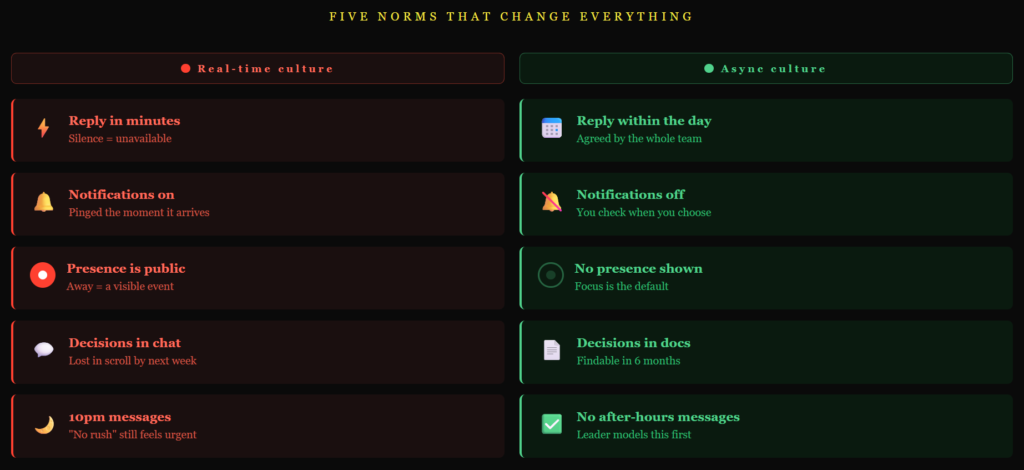
A tool change is the easy half. The harder half, and the half that actually moves the anxiety, is changing how your team uses the tool. A few things that work regardless of which app you pick.
Agree response windows out loud. Most chat anxiety comes from not knowing what is expected. If your team agrees that messages will be replied to “within the working day” rather than “right now,” half the pressure disappears. Put it in writing. The Doist async work guide is one of the better free resources on this, written by the people who built Twist.
Cut channels ruthlessly. Most teams have at least 30% more channels than they need. Audit them every quarter. Anything inactive for three months gets archived. Anything with overlapping purpose gets merged.
Turn off notifications for most channels. Default to silent. You can check important channels when you choose to. The teams with the worst Slack anxiety almost always have notifications on for too many places.
No expectation of after-hours replies. This is a culture rule, not a tool rule. The leader of the team has to model it first. If the CEO messages at 10pm, even with “no rush,” the team will read that as urgent.
Treat important things as docs, not chat. Decisions, plans, and processes belong in a doc with a clear title that you can find six months later. Chat is for the conversation around the doc, not the decision itself.
If you want a deeper read on this idea, Basecamp’s “Shape Up” and the 37signals books are the canonical references. The Cal Newport book A World Without Email covers the same ground from the focused-work side.
Bookmarks:
- Twist: Twist’s docs and Doist’s async work resources are both good starting points, since they wrote the book on this style of work.
- Basecamp: Basecamp’s help and the 37signals books (most of them free to read online).
- Microsoft Teams: Microsoft Learn for Teams is free and structured.
- Google Chat: the Workspace Learning Center for setup and tips.
- Mattermost and Rocket.Chat: Mattermost’s docs and Rocket.Chat’s docs cover the self-hosting setup, which is the part most teams trip on.
- Zulip: Zulip’s documentation does a careful job of explaining its topic model, which is the hardest concept for new users.
- Element: Element’s help center and the Matrix specification if you want to understand the federation.
For Discord, Pumble, Chanty, Flock, Spike, and Lark, each tool’s own site is enough to get going.
How to choose
Match the tool to the real reason you are leaving Slack.
- You hate the pings and want a calmer workday: Twist if you want a direct chat replacement, Basecamp if you want a whole way of working, Zulip if your team is large and busy.
- You already pay for Microsoft 365: Teams. It costs you nothing extra and the integrations are deep.
- You already pay for Google Workspace: Google Chat. Same logic.
- You want a community feel: Discord.
- Cost is the only reason: Pumble for the unlimited free plan, then Chanty if you outgrow it.
- You need to self-host for data control: Mattermost for security-first, Rocket.Chat if you also want customer chat, Element if you need end-to-end encryption.
- You want one tool for email and chat: Spike.
- You want one tool for everything: Lark.
Then test before you commit. Almost every tool here has a free tier. Move two channels worth of real work into one of these for two weeks and see how it feels. Pay particular attention to whether your team’s anxiety actually drops or whether you have just changed the brand of app you are anxious in.
The bottom line
The best chat tool is the one your team can actually live with. For some teams that is Slack with better norms. For some it is an async-first tool that physically cannot ping them at 9pm. For some it is a Microsoft Teams seat that comes free with the 365 they already pay for.
Be honest about which problem you are solving. If it is cost, this list has cheaper. If it is data control, this list has self-hosted. If it is the pings and the anxiety, switching tools without changing norms is theatre, and only the async-first group genuinely helps.
One last point, since a content marketing agency wrote this. Chat tools are very good at producing more conversation. More channels, more threads, more replies. But more was never the goal. We have written before about how marketers create their own content blindness by producing more than anyone has time to read. Team communication has the same problem, scaled to your team. The fix is not a smarter chat app. It is the discipline to send fewer messages, and to put the important ones somewhere they can be found later.
If you want help with the content side of things so you have more headspace for the rest, see what we do or book a call.
If your team also needs the right tools for async visual communication, the best AI presentation tools in 2026 are worth a look.

Rashmita is content marketer with 8 years of experience building and growing SaaS brands. Now she tests various AI tools for marketers and shares her feedback on this blog, LinkedIn, Instagram, and YouTube.